Password managersAlternatives
NordPass Alternatives: Password Managers With Better Sharing, Pricing or Privacy
NordPass alternatives compared on vendor-listed prices, free plans, family seats and sharing: 1Password, Bitwarden, Proton Pass, Passpack, Keeper and Dashlane.
Disclosure: we may earn a commission if you buy through links on this page. It costs you nothing extra and never decides a verdict or an EDGE mark. How we make money.
Verdict
Verdict
1Password is the most complete replacement for NordPass, with Travel Mode, a Secret Key and a 14-day trial23. If price is the reason you’re leaving, Bitwarden Premium is $19.80 a year with a free plan that works on unlimited devices5.
At a glance
The alternatives at a glance
| # | Tool | Best for | Starting price | Link |
|---|---|---|---|---|
| 01 | 1Password | Individuals and families who want the most complete feature set and can do without a free plan | $2.99/mo billed yearly for the first year (then $3.99/mo)checked 2026-11-20 | Visit (opens in a new tab) |
| 02 | Bitwarden | Budget switchers and anyone who wants open-source code and a usable free plan | $1.65/mo, billed annually at $19.80checked 2026-11-20 | Visit (opens in a new tab) |
| 03 | Proton Pass | Privacy-minded users who rely on email masking and want it unlimited | $1.99/mo, billed $23.88 for the first 12 months (renews at $35.88/yr)checked 2026-11-20 | Visit (opens in a new tab) |
| 04 | Passpack | Small teams that outgrow or don't fit NordPass's 10-user Teams pack | $1.66/user/mo, paid annually (Teams, up to 20 people)checked 2026-11-20 | Visit (opens in a new tab) |
| 05 | Keeper | Families who want file storage and emergency access bundled in | $3.58/mo, $42.99 billed annuallychecked 2026-11-20 | Visit (opens in a new tab) |
| 06 | Dashlane | People who want a VPN in the same subscription, or a group of up to 10 | $5.42/mo, billed annuallychecked 2026-11-20 | Visit (opens in a new tab) |
Prices are the lowest paid starting price on each vendor's public pricing page on the date shown, in US dollars, before tax. Confirm on the vendor's site before you buy.
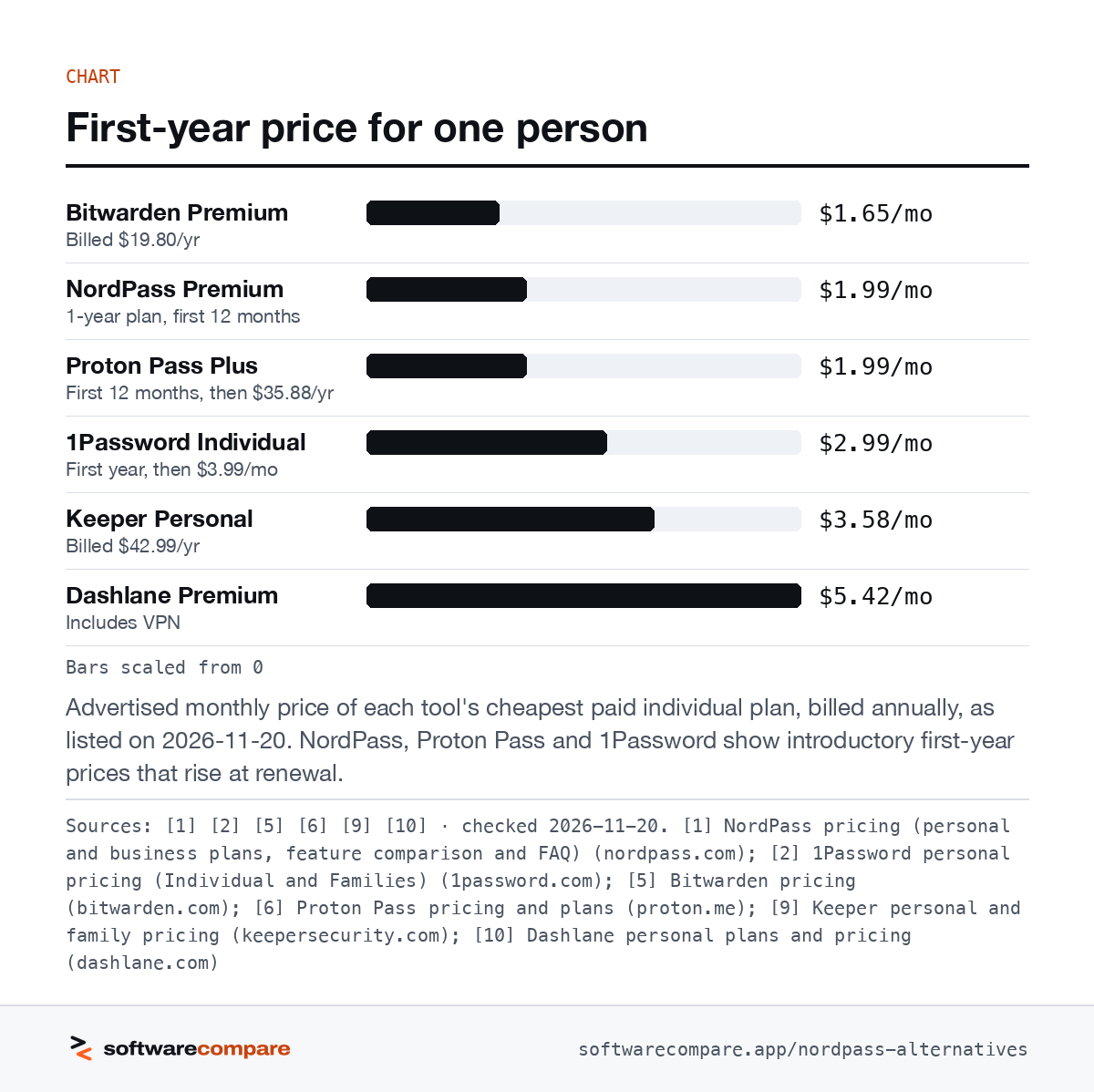
Bars scaled from 0
Advertised monthly price of each tool’s cheapest paid individual plan, billed annually, as listed on 2026-11-20. NordPass, Proton Pass and 1Password show introductory first-year prices that rise at renewal.
Sources: [1] [2] [5] [6] [9] [10] · checked 2026-11-20Download image
The best NordPass alternatives depend on why you’re leaving. If you want a more complete product, move to 1Password: Travel Mode, a Secret Key on top of your password, and sharing with people who don’t use 1Password234. If you’re leaving over price or the limits of the free plan, Bitwarden charges $19.80 a year for Premium, and its free plan works on unlimited devices5. Proton Pass is the closest match if you rely on NordPass Email Masking6.
We built this list from each vendor’s own pricing and support pages, read on 2026-11-20. We didn’t install or test these apps for this article, so there are no scores. Every price and feature below is cited, and we rank by fit for someone leaving NordPass, not by commission. Our comparison method and editorial policy explain how that works.
Why people look for NordPass alternatives
NordPass isn’t a weak product. It encrypts vaults with xChaCha20, and its Premium plan includes Password Health, a Data Breach Scanner, Email Masking, file attachments and Emergency Access1. People usually look elsewhere for one of three reasons, and all three show up on its own pricing page.
- The free plan doesn’t stay signed in across devices. NordPass Free includes autosave, autofill and password import, but its comparison table marks “Simultaneous login on multiple devices”, secure sharing and Password Health as not included. Its FAQ says switching devices without logging in again is a Premium feature1.
- Personal plans are prepaid for a year or more. The monthly option is labelled “Business plans only”1. Premium on a 1-year plan is $1.99/mo, billed $23.88 for the first 12 months against a struck-through $35.88. On the 2-year plan it’s $1.39/mo, billed $37.53 for the first 27 months1.
- Team plans come in fixed sizes. NordPass Teams is sold as a “10 users pack only”, and Business and Enterprise start at 5 users. Okta and Entra ID single sign-on are listed only on Enterprise1.
If none of these affect you, staying put is reasonable. If one does, the sections below cover where to go. For a full head-to-head with the most common destination, read NordPass vs 1Password.
| Feature | NordPass | 1Password | Bitwarden | Proton Pass |
|---|---|---|---|---|
| Free plan | Yes | No | Yes | Yes |
| Free plan on several devices at once | No | No free plan | Yes | Yes |
| Sharing on the free plan | No | No free plan | 1 other user | Vaults with 2 others |
| People on the family plan | 6 | 5 | 6 | 6 |
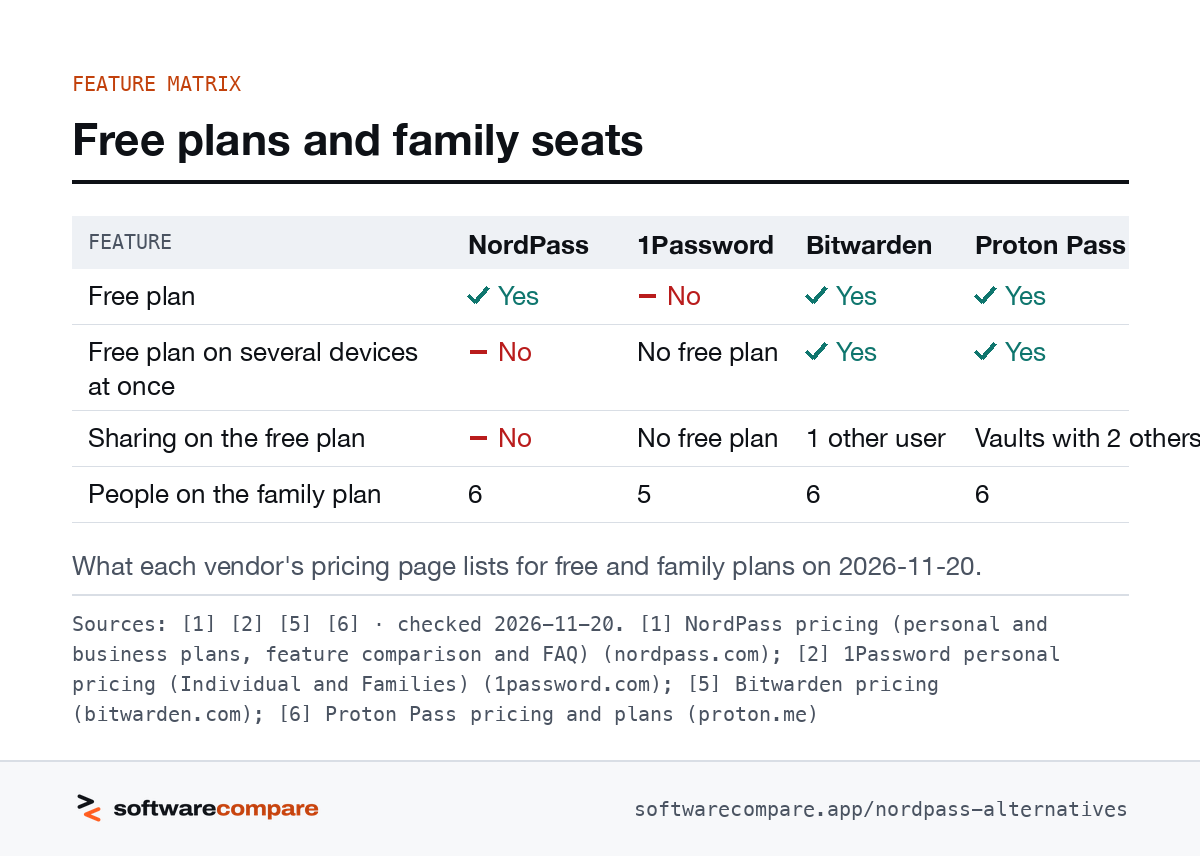
What each vendor’s pricing page lists for free and family plans on 2026-11-20.
Sources: [1] [2] [5] [6] · checked 2026-11-20Download image
1Password
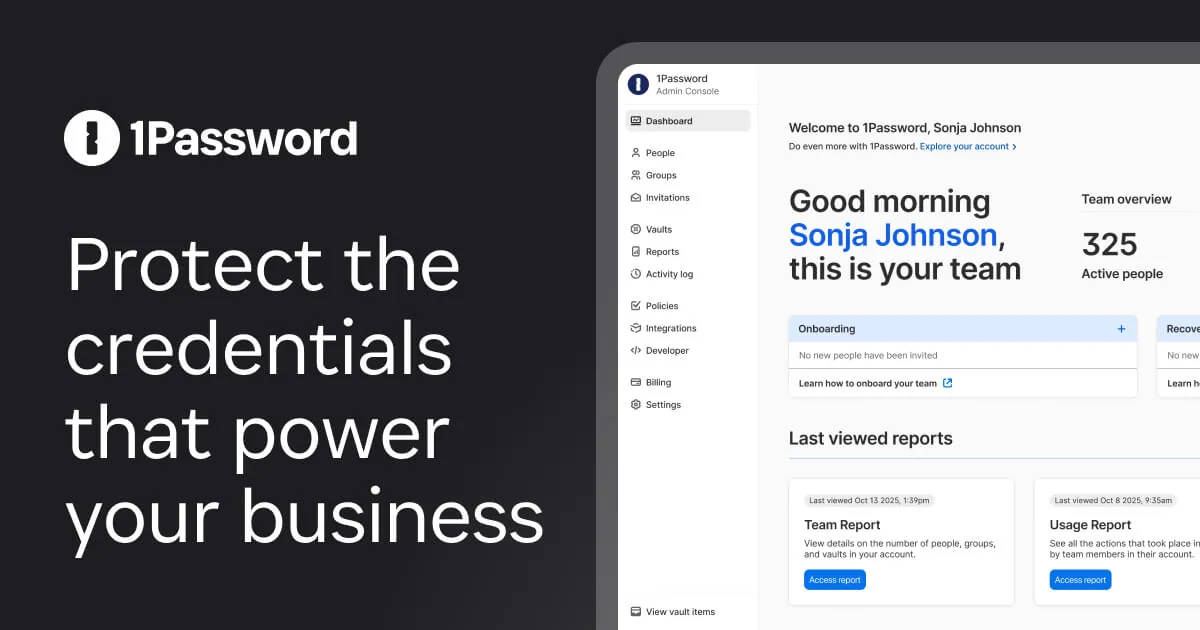
1Password is our top pick for most people leaving NordPass. It costs more, but its apps cover more devices and situations. Individual is $3.99/mo billed yearly, and the current promotion cuts the first year to $2.99/mo for new customers who buy directly from 1Password.com2. Families is $5.99/mo ($4.49/mo in the first year) and includes 5 users2. Every plan starts with a 14-day free trial that doesn’t ask for a credit card2.
What you get that NordPass’s pricing page doesn’t list:
- Travel Mode. You can remove chosen vaults from your devices before a border crossing, and they come back when you turn it off. They aren’t just hidden; they’re deleted from the device until then4.
- A Secret Key. Your account is protected by your password plus a 128-bit Secret Key that 1Password never stores3.
- Sharing outside the app. You can share items with anyone, even people without 1Password, with expiry dates and a share history2.
- Developer tools. These include SSH workflows, Git commit signing, a CLI and SDKs2.
1Password is SOC 2 Type 2 certified and publishes the results of its independent audits3. Its apps run on macOS, iOS, watchOS, Windows, Android and Linux2. The trade-offs: there’s no free plan on the pricing page, and Families covers 5 people where NordPass Family covers 612.
Bitwarden
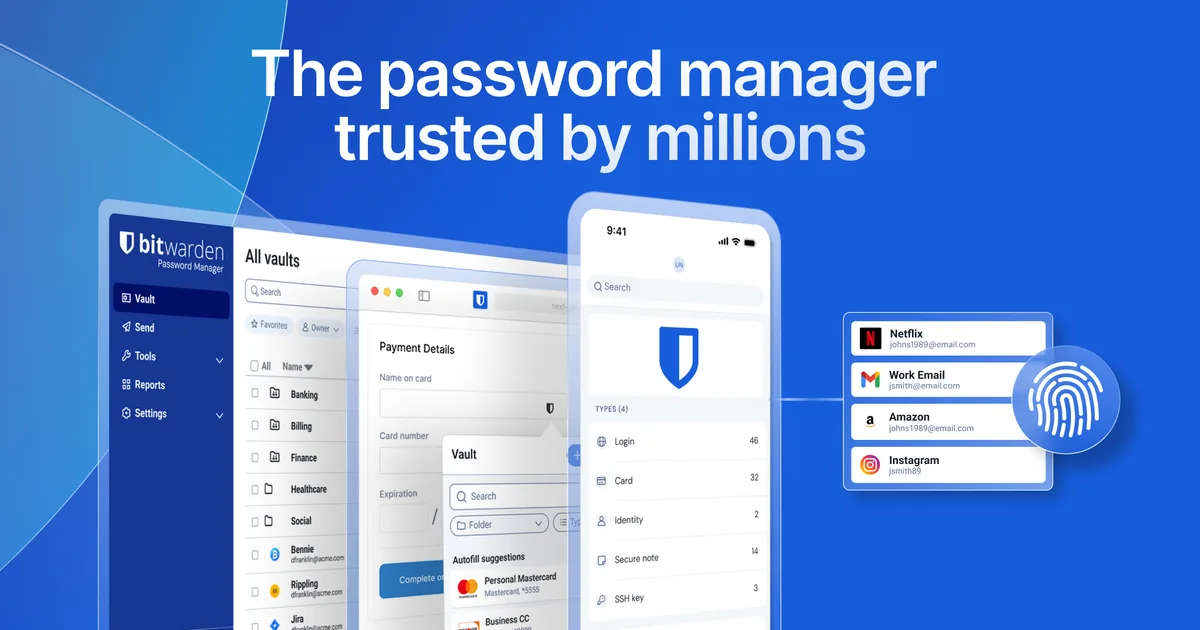
Bitwarden is the value pick, and the best free plan here for people who use more than one device. Premium is $1.65/mo, billed annually at $19.80, and the page shows no intro-price step5. Families covers up to 6 users for $47.88 a year5.
The free plan matters most for NordPass Free users. Bitwarden lists unlimited devices, unlimited passwords, passkey management, a username and password generator, and free sharing with one other user as core features of every account5. That covers NordPass Free’s biggest gap, since NordPass lists simultaneous login on multiple devices as a Premium feature1.
Bitwarden also lists open-source security and zero-knowledge encryption among its core features. Its pricing page describes self-hosting, which means running the Bitwarden server on your own network5. For teams, Teams is $4/user/mo and Enterprise is $6/user/mo, both billed annually; Enterprise adds SSO integration and policies5. Premium adds an integrated authenticator, file attachments, emergency access and security reports5.
We have no affiliate relationship with Bitwarden. It’s ranked here because it fits.
Proton Pass
Proton Pass is the natural move if NordPass Email Masking is the feature you’d miss. Proton calls these hide-my-email aliases. The free plan includes 10 of them, plus unlimited logins, unlimited devices and passkey support on all devices6. NordPass reserves Email Masking for paid plans1.
Pass Plus is $1.99/mo, billed $23.88 for the first 12 months and $35.88 a year after that6. It adds:
- unlimited aliases, custom alias domains and extra alias mailboxes
- a built-in 2FA authenticator
- item and link sharing
- Dark Web Monitoring
- file attachments and Emergency Access6
Pass Family covers 6 users at $33.48 for the first year, then $59.88 a year. Proton Unlimited bundles Pass with Proton Mail, Calendar, VPN and Drive6.
Proton says Pass encrypts every field end to end, not just the password, and points to its Swiss jurisdiction as an added privacy protection6. Pass Plus and Proton Unlimited carry a 30-day money-back guarantee6. Proton’s support site has a dedicated NordPass import guide, which makes this the most direct switch on the list7.
Passpack
Passpack is for teams, not individuals. Its plans page lists Teams, Business and Enterprise, with no personal tier8. That makes it a good fit for one particular NordPass customer: a small team that the fixed 10-user Teams pack doesn’t suit1.
Passpack Teams is $1.66 per user per month, paid annually, for teams of up to 20 people8. Business is $4.50 per user per month, paid annually, with a monthly plan available. It adds single sign-on, advanced multi-administrator support and API integration814. Both come with a 28-day free trial8. For reference, 1Password’s Teams Starter Pack is $24.95/mo billed annually for up to 10 members, with room to grow to 2013.
Passpack’s feature list includes encrypted password sharing with individuals and teams, TOTP, YubiKey support, emergency access codes, and password import and export8. Don’t expect consumer extras: email masking and a breach scanner aren’t on the plans page.
Keeper
Keeper suits families who want encrypted file storage in the same plan. Personal is $3.58/mo, or $42.99 billed annually, with unlimited devices, unlimited password sharing and 24/7 support9. Family is $7.67/mo, or $91.99 billed annually, for 5 users. It includes 10 GB of secure file storage, unlimited shared folders and emergency access for estate planning9.
The catch is extras. BreachWatch dark-web alerts and extra file storage are sold as add-ons, on top of the base plan9. NordPass includes its Data Breach Scanner in Premium1. Keeper costs more than NordPass and adds less by default, so we’d pick it mainly for the bundled family storage.
Dashlane
Dashlane is the pick if you’d otherwise pay for a VPN separately. Premium is $5.42/mo billed annually and includes a VPN for Wi-Fi protection, Dark Web Monitoring, real-time phishing alerts and unlimited secure sharing10. Friends & Family covers 10 members for $8.13/mo billed annually, though the VPN covers only the plan manager10.
Dashlane’s personal pricing page lists two paid plans and no free tier, so this is the most expensive individual option here10. It makes sense if the VPN or the 10-seat group plan replaces something you already pay for.
Moving your vault out of NordPass
The switch itself is short:
- Export from NordPass. In the desktop app or web vault, open Settings, go to Import and Export, choose Export, confirm with your Master Password, and save the CSV file11. On a business account, an admin can turn off exporting with the “Item exporting” policy, so ask them first if the button is missing11.
- Import into the new manager. 1Password imports CSV files on 1Password.com12. Proton Pass has a step-by-step NordPass import guide7.
- Delete the CSV. It holds every password in plain text. NordPass’s own guide warns never to send the file by email or over untrusted channels11.
- Check your attachments and passkeys. Look through the new vault for anything the CSV didn’t carry over before you cancel NordPass.
How to choose between NordPass alternatives
Start with why you’re leaving:
- The free plan doesn’t cover your devices: Bitwarden or Proton Pass. Both free plans work on unlimited devices56.
- You want a better paid product and don’t mind the price: 1Password, for Travel Mode, the Secret Key and sharing with people outside the app234.
- Email Masking is the feature you’d miss: Proton Pass, with 10 free aliases and unlimited on Pass Plus6.
- You manage a team of 20 or fewer: Passpack Teams, at $1.66/user/mo for up to 20 people8.
- Your family needs shared file storage: Keeper Family, with 10 GB included9.
- You also want a VPN: Dashlane Premium10.
Compare renewal prices, not first-year prices. NordPass, Proton Pass and 1Password all show introductory pricing that goes up after the first term126. Bitwarden’s $19.80 a year has no intro step5.
- You want the most complete apps and travel protection1Password
- You want the lowest flat price or open-source codeBitwarden
- You use NordPass Email Masking and want more aliasesProton Pass
- You're moving a team of up to 20 peoplePasspack
- You want 10 GB of family file storageKeeper
- You want a VPN in the same planDashlane
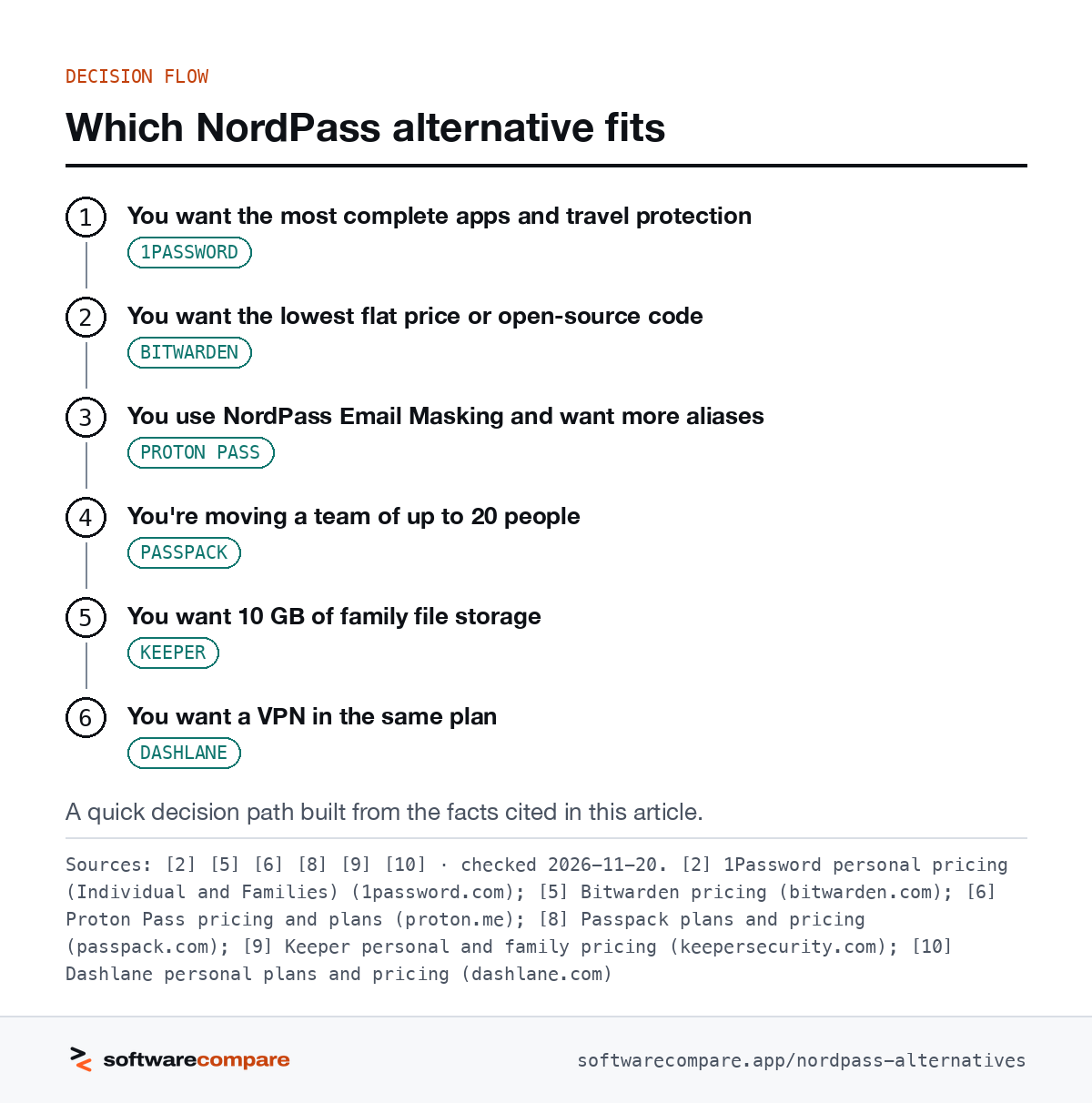
A quick decision path built from the facts cited in this article.
Sources: [2] [5] [6] [8] [9] [10] · checked 2026-11-20Download image
Strengths and limits
Strengths and limits
1Password
Visit 1Password (opens in a new tab)Strengths
- Travel Mode removes chosen vaults from your devices while you travel
- Account protected by your password plus a 128-bit Secret Key
- Share items with people who don't use 1Password
- 14-day free trial with no credit card
Limits
- No free plan on the pricing page
- Families covers 5 people; NordPass Family covers 6
- First-year promo price rises at renewal
Bitwarden
Visit Bitwarden (opens in a new tab)Strengths
- Free plan with unlimited devices and unlimited passwords
- Premium is $19.80 a year with no intro-price step
- Families plan covers 6 users for $47.88 a year
- Lists open-source security and self-hosting options
Limits
- Free plan shares with only one other user
- No affiliate relationship with us, so no tracked link
Proton Pass
Visit Proton Pass (opens in a new tab)Strengths
- Free plan includes unlimited devices, passkeys and 10 hide-my-email aliases
- Pass Plus adds unlimited aliases, a built-in 2FA authenticator and Dark Web Monitoring
- Has a published import guide for NordPass
- Swiss jurisdiction and encryption of every item field
Limits
- Intro price rises at renewal
- Item sharing and 2FA codes need a paid plan
Passpack
Visit Passpack (opens in a new tab)Strengths
- Teams plan is priced per user for up to 20 people
- 28-day free trial
- Business plan offers a monthly option and single sign-on
Limits
- No individual or family plan on the plans page
- Fewer consumer extras (no email masking or breach scanner listed)
Strengths
- Family plan includes 10 GB of secure file storage
- Emergency access listed on the Family plan
- Unlimited devices and sharing on Personal
Limits
- Dark-web alerts (BreachWatch) are a paid add-on
- Family plan covers 5 users
Dashlane
Visit Dashlane (opens in a new tab)Strengths
- Premium includes a VPN for Wi-Fi protection
- Friends & Family covers 10 members for $8.13/mo
- Real-time phishing alerts and Dark Web Monitoring
Limits
- Highest individual price in this list
- Personal pricing page lists no free plan
- Family VPN covers the plan manager only
FAQ
Questions people ask
What is the best free alternative to NordPass?
Is 1Password more expensive than NordPass?
Which NordPass alternative is best for families?
Can I move my passwords from NordPass to another password manager?
Sources
Sources
Small numbers in the text, like 1, point here. Each source shows the date we last checked it.
- 1NordPass pricing (personal and business plans, feature comparison and FAQ)nordpass.com
- 21Password personal pricing (Individual and Families)1password.com
- 31Password security1password.com
- 41Password Travel Mode1password.com
- 5Bitwarden pricingbitwarden.com
- 6Proton Pass pricing and plansproton.me
- 7Import passwords to Proton Pass (Proton support)proton.me
- 8Passpack plans and pricingpasspack.com
- 9Keeper personal and family pricingkeepersecurity.com
- 10Dashlane personal plans and pricingdashlane.com
- 11How to export passwords from NordPass (NordPass support)support.nordpass.com
- 12Move your data from other applications to 1Password (1Password support)support.1password.com
- 131Password business pricing (Teams Starter Pack and Business)1password.com
- 14Passpack home page (plan summaries)passpack.com
Updated . See something out of date? Tell us and we will check it against the vendor's page.