Password managersVersus
LastPass vs 1Password: Should You Switch After the 2022 Breach?
LastPass vs 1Password for current LastPass users: plan prices, sharing, SSO, passkeys, the 2022 breach in LastPass's own words, and how the switch works.
Disclosure: we may earn a commission if you buy through links on this page. It costs you nothing extra and never decides a verdict or an EDGE mark. How we make money.

Verdict
Verdict
Switch to 1Password if the 2022 breach is why you’re asking: a copied 1Password vault can’t be decrypted without a 128-bit Secret Key that 1Password never holds6, and its desktop app imports your LastPass vault and shared folders directly11. Stay on LastPass if price is the deciding factor, since its Families and Business plans list for less per month123.
Head-to-head
1Password vs LastPass, criterion by criterion
| Criterion | 1Password | LastPass |
|---|---|---|
| Individual plan (per month, billed annually)13 | Individual $3.99; $2.99 for new customers’ first year1 | Premium $3.00; free plan limited to one device type3 |
| Family plan (per month, billed annually)13 | Families $5.99 for 5 people; $4.49 first-year promo1 | Families $4.00 for 6 Premium accounts3Edge |
| Small team pricing (billed annually)23 | Teams Starter Pack $24.95/mo flat for up to 10 members; up to 10 more seats at $4.99 each2 | Teams $4.25/user/mo, up to 50 users3 |
| Business plan (per user/mo, billed annually)23 | Business $8.992 | Business $7.00; Business Max $11.003Edge |
| Sharing137 | Shared vaults; single items by link to anyone, with expiry and email restriction17 | One-to-one sharing on Premium; shared folders on Families, Teams and Business3 |
| Identity provider and SSO238 | Business: unlock with SSO over OIDC; provisioning from Entra ID, Google Workspace, Okta, OneLogin, Rippling, JumpCloud28 | Business: federated login and directory integrations; SSO for 3 apps, unlimited on Business Max3 |
| Admin, logs and SIEM23 | Business: custom groups, policies, reports, event streaming to Splunk, Elastic, Sumo Logic, Panther2 | Teams: 25 policies, basic reporting. Business: 100+ policies, groups, SIEM to Splunk and Microsoft Sentinel3 |
| Passkeys910 | Save and sign in from the browser and on iOS 17; passkey unlock for new Individual accounts in public beta9 | Create, store and sync passkeys; master password still opens the vault10 |
| What protects a stolen vault copy346 | Account password plus a 128-bit Secret Key that is never sent to 1Password6Edge | Key derived from the master password with PBKDF2; 100,100 iterations was the default in 202234 |
EDGE marks the side the cited facts favor on that row. No mark means the facts don't clearly favor either side. Numbers after a criterion point to its sources.
1Password
From $3.99/mo billed annually ($2.99 first year for new customers) · checked
Visit 1Password (opens in a new tab)LastPass
From Free (one device type); Premium $3.00/mo billed annually · checked
Visit LastPass (opens in a new tab)If you’re a LastPass user weighing LastPass vs 1Password, the deciding question is what you want from the switch. If the 2022 breach shook your trust, 1Password’s two-secret key design and its direct LastPass importer are the reasons to move. If LastPass’s price is what keeps you there, its list prices are lower for families and for per-seat business plans123. We cover the money first, then sharing, admin, passkeys, the security model, the breach as LastPass described it, and the move itself.
We didn’t test either product hands-on for this comparison. Every price and feature below comes from the vendors’ own pages, checked on 2026-11-20, and our method explains how we pick an edge.
LastPass vs 1Password: the verdict for current LastPass users
Switch to 1Password if any of these apply:
- You want a vault copy stolen from the vendor to be useless without a second secret you hold6.
- You share logins with contractors or clients who don’t have a password manager7.
- You want the move done in one import that keeps shared folders and their permissions11.
Stay on LastPass if all of these apply:
- You’re satisfied with the steps LastPass took after the incident.
- You want the lower family or per-seat price3.
- You use its bundled SSO for other business apps3.
Start a 1Password trial if you’re leaning toward the switch. It runs 14 days, with no credit card needed12.
Pricing for individuals, families and teams
All prices below are per month, billed annually, in USD.
| Plan | 1Password | LastPass |
|---|---|---|
| Free | None (14-day trial)1 | Free, one device type3 |
| One person | Individual $3.99 ($2.99 first year)1 | Premium $3.003 |
| Household | Families $5.99 for 5 ($4.49 first year)1 | Families $4.00 for 63 |
| Small team | Teams Starter Pack $24.95 flat, up to 10 members2 | Teams $4.25/user, up to 503 |
| Business | $8.99/user2 | Business $7.00/user; Business Max $11.00/user3 |
1Password’s lower Individual and Families prices are a promotion. They apply to new customers who buy direct from 1Password.com, for the first year on annual billing. The regular prices are $3.99 and $5.991. LastPass’s pricing page showed list prices with no first-year discount when we checked, and its footnote says promotional pricing may not apply to current customers3.
The free tiers differ more than the price lists suggest. LastPass Free works on one device type, either computers or mobile, and shares one item with one person at a time3. 1Password lists no free plan, only a 14-day trial1.
LastPass Teams vs Business
For a team, the split inside LastPass matters as much as the split between vendors.
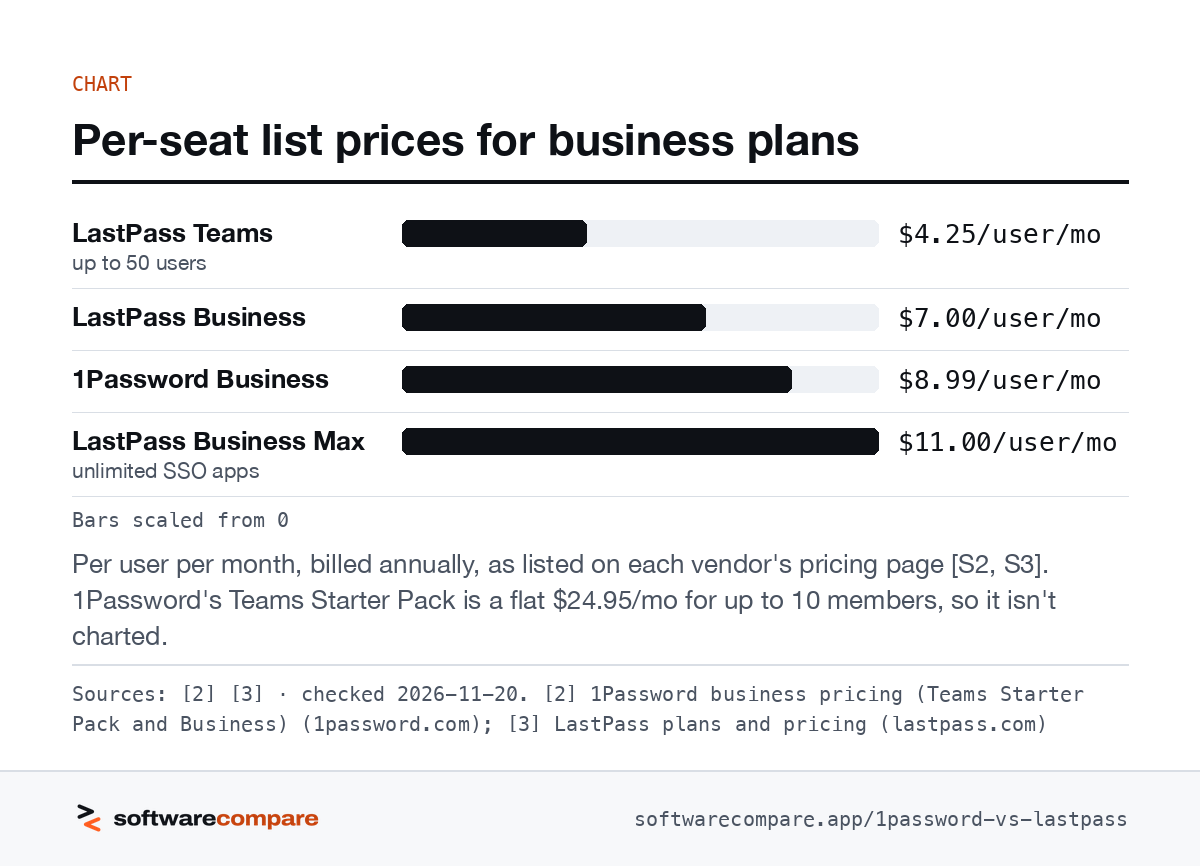
LastPass Teams costs $4.25/user/mo and stops at 50 users. It comes with 25 security policies and basic reporting. It has no groups, SIEM, directory integrations, federated login or SSO3.
Business costs $7.00/user/mo with no user cap. It adds 100+ policies, groups, advanced reporting, SIEM integrations, directory sync with Active Directory, Entra ID, Google Workspace, OneLogin and Okta, and federated login. It also gives each employee a personal LastPass Families account3.
On the 1Password side, Teams Starter Pack is a flat $24.95/mo for up to 10 members. You can add up to 10 more seats at $4.99 each, for 20 at most. Past that you move to Business at $8.99/user2.
Bars scaled from 0
Per user per month, billed annually, as listed on each vendor’s pricing page23. 1Password’s Teams Starter Pack is a flat $24.95/mo for up to 10 members, so it isn’t charted.
Sources: [2] [3] · checked 2026-11-20Download image
Sharing passwords
Both tools handle sharing inside your account. 1Password uses shared vaults: Families gets unlimited shared vaults and 5 guest accounts1. LastPass uses shared folders, which come with Families, Teams and Business but not Premium3.
The difference shows up with outsiders. 1Password lets you send a link to a copy of any item to someone who doesn’t use 1Password. You set when the link expires and can limit it to specific email addresses; business accounts can limit it to a whole domain7. On LastPass’s pricing page, Premium sharing is described as one-to-one sharing with a trusted family member or friend3.
Admin, SSO and identity providers
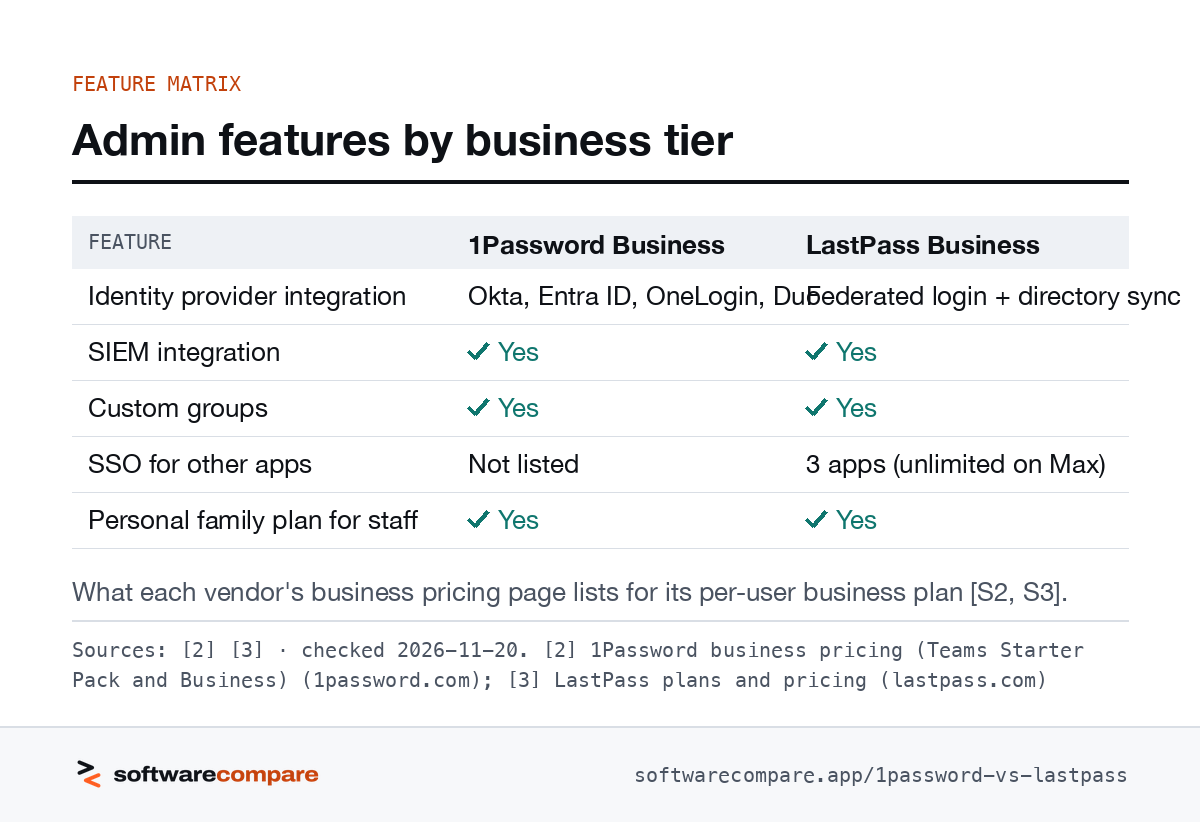
1Password Business connects to Okta, Entra ID, OneLogin and Duo2. Staff can unlock with SSO through any OpenID Connect provider on 1Password’s list, which includes Google, JumpCloud and Ping Identity8.
It provisions users and groups from Azure AD, Google Workspace, Okta, OneLogin, Rippling and JumpCloud. It also streams events to Splunk, Elastic, Sumo Logic and Panther2.
LastPass Business gives you federated login, so staff sign in to the vault with your identity provider, plus directory integrations and SIEM feeds to Splunk and Microsoft Sentinel3. LastPass also sells SSO for your other apps: Business covers 3 apps, and Business Max at $11.00/user/mo makes it unlimited and adds workstation MFA and contextual policies3. If you’d otherwise pay for a separate SSO product, count that in LastPass’s favour.
| Feature | 1Password Business | LastPass Business |
|---|---|---|
| Identity provider integration | Okta, Entra ID, OneLogin, Duo | Federated login + directory sync |
| SIEM integration | Yes | Yes |
| Custom groups | Yes | Yes |
| SSO for other apps | Not listed | 3 apps (unlimited on Max) |
| Personal family plan for staff | Yes | Yes |
What each vendor’s business pricing page lists for its per-user business plan23.
Sources: [2] [3] · checked 2026-11-20Download image
Passkeys
Both store passkeys next to passwords. LastPass syncs them across devices from its browser extension and mobile app, but you still open the vault with your master password10.
1Password saves and signs in with passkeys from the browser and on iOS 17. You can share a passkey through a shared vault9. Unlocking 1Password itself with a passkey is in public beta for new Individual accounts9.
Security model: what protects a stolen vault
This is the section that matters most after 2022. Both vendors encrypt your vault on your device with AES-256 and say they never see your secrets236. The difference is what an attacker needs once they have a copy of your encrypted vault.
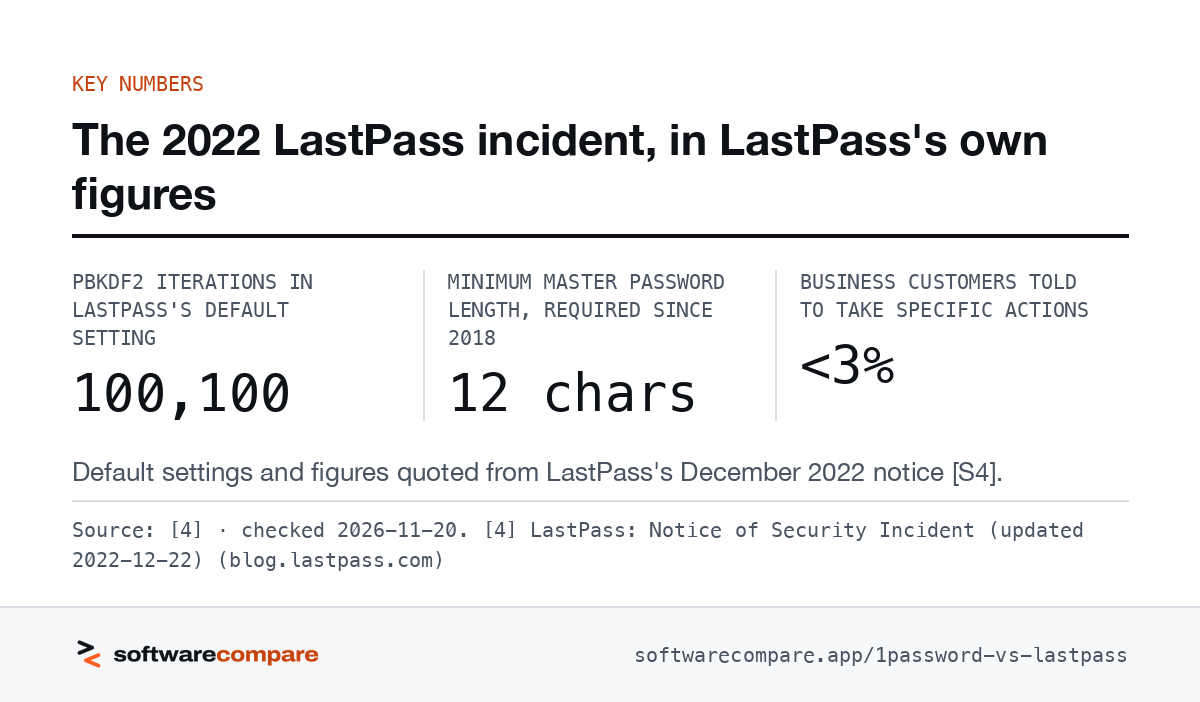
LastPass derives the decryption key from your master password, using PBKDF2 SHA-2563. A stolen vault is therefore as strong as that one password, and LastPass’s own breach notice says as much. With its defaults, a 12-character minimum and 100,100 PBKDF2 iterations, LastPass said guessing would take “millions of years”. For master passwords below those defaults it said guessing would take far fewer attempts4.
1Password combines your account password with a Secret Key. That key is a 34-character code, created on your device, with 128 bits of entropy. Neither secret is sent to 1Password, so someone who steals data from its servers can’t decrypt it without the Secret Key6. The trade-off is that you have to keep the Secret Key, which 1Password can’t recover for you6.
The 2022 LastPass breach, in LastPass’s own words
Everything in this section comes from LastPass’s own notices45.
- August 2022. Someone used one compromised developer account to get into LastPass’s development environment. They took source code and technical information. LastPass said no customer data or encrypted vaults were accessed at that point4.
- The second intrusion. The attacker used what they took in August to target another employee. LastPass’s March 2023 update says that employee was a senior DevOps engineer. The attacker exploited vulnerable third-party software to plant malware and steal secrets that opened LastPass’s cloud backups45.
- Account data copied. This was basic account information: company names, end-user names, billing addresses, email addresses, phone numbers and IP addresses4.
- Vault data copied. The backups held customer vaults. Usernames, passwords, secure notes and form-fill data were encrypted. Website URLs were not, and neither were some file paths and email address uses45.
- Also copied. Configuration data, API and integration secrets, and a backup of the MFA and federation database. That database held LastPass Authenticator seeds, MFA backup phone numbers and the federation “K2” key. It was encrypted, but its decryption key was among the stolen secrets5.
- Activity ended. LastPass says it saw no threat-actor activity after October 26, 20225.
LastPass told users on default settings that it recommended no action. Users with weaker master passwords should consider changing the passwords for sites stored in their vault4. Business customers got separate security bulletins5.
If you used LastPass before late 2022 and are switching anyway, that advice still applies after the move. Change the passwords for your important accounts, starting with any whose master password was below the defaults.
- PBKDF2 iterations in LastPass's default setting
- 100,100
- Minimum master password length, required since 2018
- 12 chars
- Business customers told to take specific actions
- <3%
Default settings and figures quoted from LastPass’s December 2022 notice4.
Source: [4] · checked 2026-11-20Download image
How to migrate from LastPass to 1Password
1Password’s desktop app imports straight from your LastPass account, so you don’t export a CSV first11. The steps:
- Create a 1Password account and sign in on the desktop app for Mac, Windows or Linux11.
- If you sign in to LastPass with SMS codes, switch to another MFA method first. If you use SSO through Google Workspace, Entra ID, Okta or OneLogin, add the redirect URI that 1Password lists. Other identity providers have to use the import on 1Password.com11.
- Choose File > Import > LastPass on a Mac, or the ellipsis menu > Import > LastPass on Windows and Linux. Then enter your LastPass details11.
What comes across: passwords, notes, attachments, one-time passwords and items shared with you. Private folders become tags. Shared folders become vaults with matching permissions. Only a shared folder’s LastPass admin can import it11.
What doesn’t come across: passkeys, private items’ password history, codes stored in LastPass Authenticator, and permissions for people who aren’t in your 1Password account11. Recreate those passkeys on each site, and re-add your authenticator codes by hand.
Once the import is done, 1Password says to uninstall LastPass to avoid conflicts. Then run Watchtower to find weak or exposed passwords11.
Which should you pick?
- You’re a LastPass Premium or Families user who’s uneasy about 2022: pick 1Password. The Secret Key answers the exact risk LastPass described, and the first year costs $2.99/mo for Individual or $4.49/mo for Families16.
- You’re a team under 20 people: price both. 1Password’s Teams Starter Pack is a flat $24.95/mo for up to 10 members2. LastPass Teams at $4.25/user costs less only up to 5 users, and it has no SSO or groups3.
- You run IT for a larger company: 1Password Business at $8.99/user covers SSO unlock over OIDC and user provisioning from your directory28. LastPass Business at $7.00/user, or Business Max at $11.00, makes more sense only if you’ll use its app SSO and MFA add-ons3.
- You need it free: LastPass Free works on one device type3. 1Password has no free plan1.
If privacy and price are both on your list, our Proton Pass vs 1Password comparison looks at a cheaper, open-source option. Our editorial policy explains how affiliate links work on this page.
Strengths and limits
Strengths and limits
1Password
Visit 1Password (opens in a new tab)
Strengths
- Account password plus a 128-bit Secret Key that 1Password never receives [S6]
- Desktop app imports a LastPass vault directly, shared folders included [S11]
- Share a single item by link with people who don't use 1Password [S7]
- Business plan unlocks with SSO from Okta, Entra ID, Google and other OIDC providers [S8]
Limits
- No free plan on its personal pricing page, only a 14-day trial [S1]
- Business lists at $8.99/user/mo against LastPass Business at $7.00 [S2, S3]
- Families covers 5 people; LastPass Families covers 6 [S1, S3]
LastPass
Visit LastPass (opens in a new tab)
Strengths
- Free plan, plus Premium at $3.00/mo and Families at $4.00/mo for 6 accounts [S3]
- Business includes SSO for 3 apps; Business Max makes it unlimited [S3]
- Teams plan covers up to 50 users at $4.25/user/mo [S3]
Limits
- 2022 incident: attackers copied vault backups in which website URLs were unencrypted [S4, S5]
- Free plan works on one device type only, computer or mobile [S3]
- Teams has no groups, SIEM, directory integrations or SSO [S3]
FAQ
Questions people ask
Is 1Password safer than LastPass?
The designs differ in one way that matters after a server breach. 1Password encrypts your data with a key built from your account password and a 128-bit Secret Key it never receives6. LastPass derives its key from your master password alone3, and after its 2022 incident it said users with non-default master passwords should consider changing their stored website passwords4.
What did attackers get in the LastPass breach?
By LastPass’s account, they copied customer account metadata and backups of vault data. Usernames, passwords, secure notes and form-fill data were encrypted, but website URLs were not4. A later update added API and integration secrets and an encrypted MFA and federation database whose decryption key was also stolen5.
Is LastPass cheaper than 1Password?
How do I move from LastPass to 1Password?
Install the 1Password desktop app on Mac, Windows or Linux and choose Import, then LastPass. It signs in to LastPass and brings over items, attachments, one-time passwords and shared folders as vaults. Passkeys and LastPass Authenticator codes don’t come across11.
What's the difference between LastPass Teams and Business?
Teams is $4.25/user/mo for up to 50 users with 25 policies and basic reporting. Business is $7.00/user/mo with no user cap and adds 100+ policies, groups, SIEM, directory integrations, federated login and SSO for 3 apps3.
Sources
Sources
Small numbers in the text, like 1, point here. Each source shows the date we last checked it.
- 11Password personal pricing (Individual and Families)1password.com
- 21Password business pricing (Teams Starter Pack and Business)1password.com
- 3LastPass plans and pricinglastpass.com
- 4LastPass: Notice of Security Incident (updated 2022-12-22)blog.lastpass.com
- 5LastPass: Security Incident Update and Recommended Actions (2023-03-01)blog.lastpass.com
- 6About your Secret Key (1Password Support)support.1password.com
- 7Securely share 1Password items with anyone (1Password Support)support.1password.com
- 8Set up 1Password Unlock with SSO (1Password Support)support.1password.com
- 9Passkeys in 1Password1password.com
- 10LastPass passkey managerlastpass.com
- 11Move your data from LastPass to 1Password in the desktop app (1Password Support)support.1password.com
Updated . See something out of date? Tell us and we will check it against the vendor's page.