

Security operationsGuide
Optery Review: Broker Coverage, Removal Proof and Which Plan to Pick
Optery review from its public docs: Free, Core, Extended, Ultimate and Business plans, broker counts, removal reports and whether Optery is legit.
Disclosure: we may earn a commission if you buy through links on this page. It costs you nothing extra and never decides a verdict or an EDGE mark. How we make money.

Verdict
Verdict
Optery is a good fit if you want proof of removal: Extended ($149 a year) and Ultimate ($249 a year) add before-and-after screenshot reports about every three months and cover 550+ and 620+ sites12. Core ($39 a year) is the cheap automated option, and the free plan shows where you are exposed before you pay anything1.
At a glance
At a glance
| # | Tool | Best for | Starting price | Link |
|---|---|---|---|---|
| 01 | Optery | People who want screenshot proof of removals and a free scan before they pay | Free; paid from $3.25/mo ($39 billed yearly)checked 2026-11-20 | Visit (opens in a new tab) |
| 02 | DeleteMe | People who want a named human expert and quarterly reports, at a single yearly price | $129/yr for 1 person ($10.75/mo billed annually)checked 2026-11-20 | Visit (opens in a new tab) |
| 03 | Kanary | Security teams protecting executives or clients, with weekly scans on the higher tier | $250/yr per account (Core)checked 2026-11-20 | Visit (opens in a new tab) |
Prices are the lowest paid starting price on each vendor's public pricing page on the date shown, in US dollars, before tax. Confirm on the vendor's site before you buy.
This Optery review is based on Optery’s public documentation, pricing page and help center, all checked on 2026-11-20. We did not run a hands-on test. Optery scans data brokers and people-search sites for your personal details and files opt-out requests to have them removed. Its pitch is proof: screenshots of where you were listed, then screenshots after removal. Below we cover the plans, the broker counts as Optery states them, how the removal reports work, and whether Optery is legit, with DeleteMe and Kanary as reference points from their own pricing pages. Our method is on the how we compare page.
Optery review: the short verdict
Start with Free Basic. It gives you an Exposure Report with screenshots from the sites where Optery found your profile, plus self-service removal tools, without a credit card15. That tells you whether you need a paid plan at all.
If you do, Extended at $149 a year is the plan most people should look at first1. It is the cheapest tier with a human Privacy Agent, unlimited name variations and past addresses, and the before-and-after Removals Reports that let you check Optery’s work12. Core at $39 a year is fine if you have one name and one address and don’t need proof1. Ultimate at $249 a year is for people at higher risk who want custom removals beyond the standard list1.
How Optery works
Optery’s documentation describes a loop of scan, report, opt out and repeat:
- Scan. You sign up and Optery scans the sites it covers, plus your Google and Bing results1. Free Basic users get a full scan at signup3.
- Exposure Report. You get a set of screenshots showing where your information appears. Optery notes the report is a snapshot and does not cover every broker it supports5.
- Opt-outs. On paid plans, Optery submits removal requests for you. On Free Basic you use the self-service tools13.
- Repeat. Paid plans submit and re-submit opt-outs at least once every 30 days until a broker confirms removal, and Privacy Agents review opt-outs monthly for quality assurance3. Free Basic rescans about every three months if you have logged in during that period3.
- Proof. Extended and Ultimate customers get Removals Reports about every three months2.
Core is fully automated, with no human Privacy Agent assigned for quality checks or special cases. Extended and Ultimate use what Optery calls a “humans + machines” approach1.
Optery plans and pricing
| Plan | Yearly billing | Monthly billing | Automated removal sites | Notable limits and extras |
|---|---|---|---|---|
| Free Basic | Free | Free | Self-service only | Exposure Report, Google and Bing scan |
| Core | $39/yr ($3.25/mo) | $3.99/mo | 375+ (150+ without Expanded Reach) | 1 name and 1 city/state for removals |
| Extended | $149/yr ($12.42/mo) | $14.99/mo | 550+ (325+) | Privacy Agent, Removals Reports, map blurring |
| Ultimate | $249/yr ($20.70/mo) | $24.99/mo | 620+ (395+) | Custom removals for 935+ sites, priority support |
Source: Optery pricing page, US prices1.
Yearly billing saves about 17%, every paid plan has a 30-day money-back guarantee, and you can cancel at any time1.
What each step up buys you1:
- Core adds monthly automated scans and removals, opt-out progress and exposure risk reporting, and automatic opt-outs from newly supported brokers. Removals are limited to one name and one city and state.
- Extended lifts that limit with unlimited name variations and past cities and states, assigns a human Privacy Agent, adds Removals Reports every ~90 days, and can blur your home on Google Maps and Apple Maps.
- Ultimate adds unlimited custom removal requests (eligible after 30 days), submissions to the outdated-content tools at Google, Bing, DuckDuckGo and Yahoo, and priority email support.
Broker coverage: what the numbers mean
Optery publishes its coverage per plan and lists the covered sites by tier on its pricing page1. Two details matter when you read the headline counts.
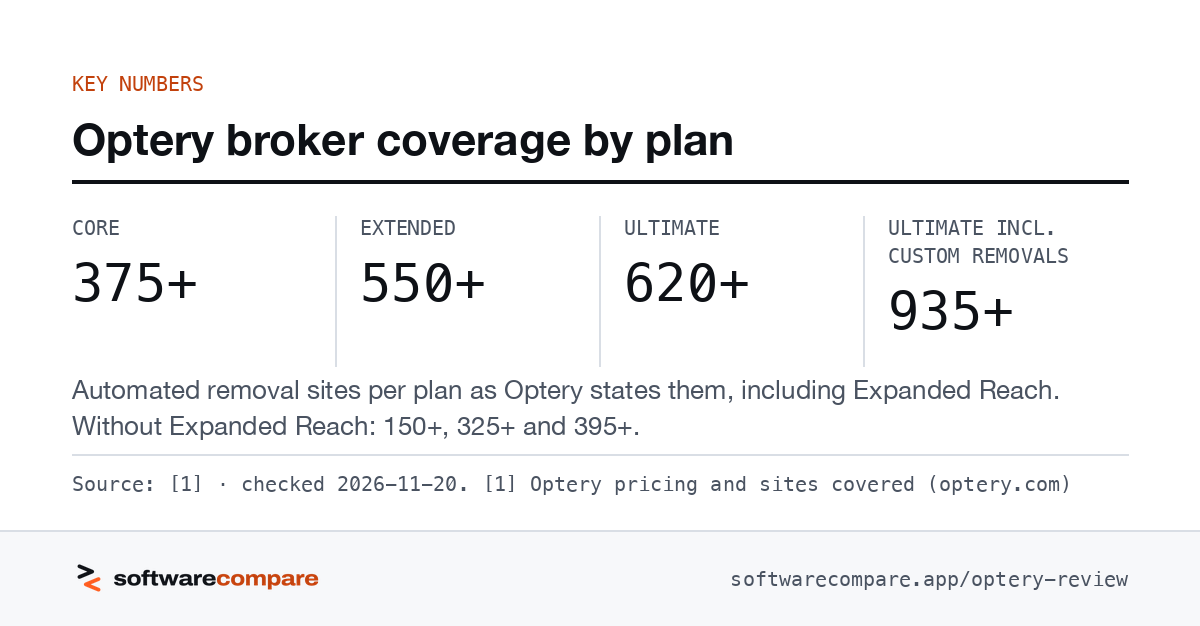
First, the bigger number includes Expanded Reach. Without it, Core covers 150+ sites, Extended 325+ and Ultimate 395+1. Expanded Reach is an optional, free add-on for paying customers. It sends requests to brokers that have a working opt-out route but don’t yet meet Optery’s verification standards, and it requires you to sign a Limited Power of Attorney first4. Optery is candid about the trade-off: these requests may send your full name, city and state to brokers that didn’t have them in the first place4. You can turn it off at any time4.
Second, Ultimate’s 935+ figure is a total that includes unlimited custom removal requests, which become available 30 days after you subscribe1. It is a ceiling on where you can ask, not the automated list.
Our read: compare plans on the without-Expanded-Reach numbers first, then decide whether the wider net is worth sharing your details with more brokers.
- Core
- 375+
- Extended
- 550+
- Ultimate
- 620+
- Ultimate incl. custom removals
- 935+
Automated removal sites per plan as Optery states them, including Expanded Reach. Without Expanded Reach: 150+, 325+ and 395+.
Source: [1] · checked 2026-11-20Download image
Removal reports and proof of work
The Removals Report is the feature that sets Optery’s paid tiers apart. Each report pairs before-and-after screenshots of the broker pages where you were listed2. Optery generates them about every three months for Extended and Ultimate customers, once the paid subscription has been active for at least three months2.
There are limits. Screenshots appear only when a public profile was available to capture, though Optery says it still tracks the opt-out request when there is no screenshot2. Core customers get opt-out progress reporting but not Removals Reports1.
For comparison, DeleteMe’s pricing page lists quarterly privacy reports on all its plans9, and Kanary emails reports monthly or twice a month depending on how the account is managed10.
Is Optery legit?
Based on what Optery documents, yes, it is a real company with verifiable claims:
- Founded in 2020 and headquartered in Clayton, California, in the San Francisco Bay Area, by co-founders Lawrence Gentilello, Chen Atlas and Dekel Barzilay8.
- Backed by Y Combinator, per its about page8.
- States SOC 2 Type II attestation78.
- Offers a 30-day money-back guarantee on paid plans1.
- Shows its work with screenshot-based Exposure and Removals Reports you can check against the broker sites yourself25.
Two things to know before you sign up. Expanded Reach needs a Limited Power of Attorney4. And removal is ongoing work: brokers can re-list you, which is why Optery re-submits opt-outs at least every 30 days3. No service can promise your data stays gone, so judge it on the reports.
What to check in your first 30 days
Optery’s 30-day money-back guarantee1 gives you a window to test the parts that matter. Based on its documentation, this is what we would check:
- Your Exposure Report. Open the screenshots and confirm the listings are really you. The report is a snapshot, not a full census of every covered broker5.
- Opt-out progress. Paid plans start submitting requests and re-submit at least every 30 days3, so the dashboard should show requests in flight within the first month.
- Expanded Reach. Decide whether to sign the Limited Power of Attorney and switch it on, given that it may share your name, city and state with new brokers4.
- Name and address limits. If you are on Core and have past addresses or a maiden name, the one-name, one-city limit applies to removals1. That is the main reason to move up to Extended.
Removals Reports won’t arrive inside that window, because they need three months of an active Extended or Ultimate subscription2. Judge the first month on the dashboard instead.
Optery for Business
Optery for Business is aimed at protecting employees from phishing, business email compromise, harassment and physical threats that start with exposed personal data7. Its pricing page lists Free, Core, Ultimate and Enterprise tiers but shows no prices; you get a quote6.
What the business pricing page does state6:
- Seats are counted per employee or contractor.
- Free allows up to 10 Free Basic members per business account.
- SSO and SCIM are add-ons on Core and Ultimate and included on Enterprise.
- Enterprise is described as tailored coverage for 100+ team members, with family-member protection options.
- Yearly billing is paid upfront; monthly billing costs about 20% more over 12 months.
The business page describes an admin dashboard that tracks exposure reduction over time7.
How Optery compares with DeleteMe and Kanary
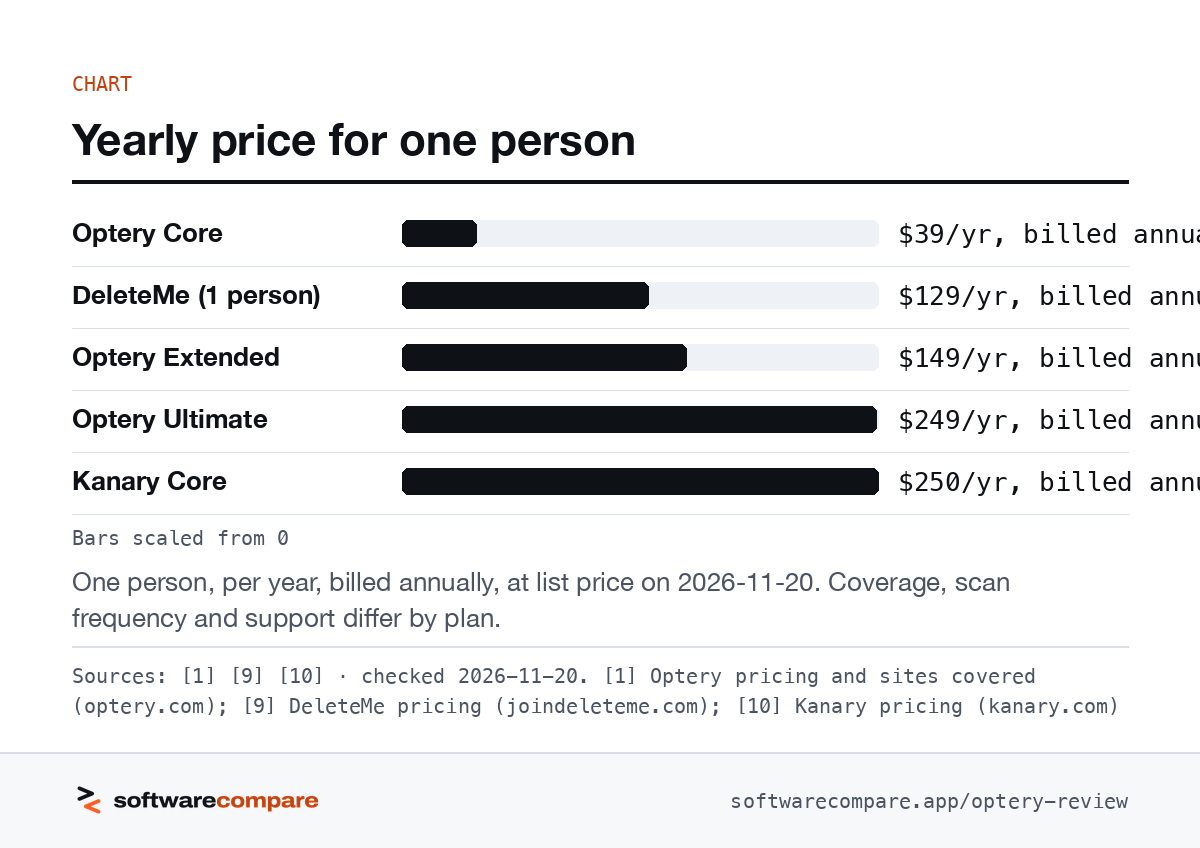
DeleteMe lists $129 a year for one person on a one-year plan ($10.75 a month billed annually)9. Every DeleteMe plan includes quarterly privacy reports, a personal DeleteMe Expert, custom removal requests and new opt-outs added during the year, and DeleteMe says it has been in business since 20119. Optery Core costs less ($39) and Extended costs a little more ($149)1. DeleteMe’s pricing page does not show a free tier.
Kanary sits at the top of the price range: Core is $250 a year per account and Advanced is $50010. It covers search engines, data brokers and social media, with monthly scans on Core and weekly scans, unlimited custom removals and attorney-general escalation on Advanced10. Its team setup, SSO and API point it at security teams protecting executives or clients10.
On published price per person per year, Optery Core is the cheapest paid option of the three, and Optery Ultimate costs about the same as Kanary Core110.
Bars scaled from 0
One person, per year, billed annually, at list price on 2026-11-20. Coverage, scan frequency and support differ by plan.
Sources: [1] [9] [10] · checked 2026-11-20Download image
Which Optery plan to pick
- Free Basic if you haven’t scanned yet. It costs nothing and shows your exposure with screenshots15.
- Core if you have one name and one current address and want low-cost automated removals1.
- Extended if you have moved, changed names or use aliases, or you want before-and-after proof12.
- Ultimate if you are a public figure or at higher risk and want custom removals and search-engine cleanup1.
- Optery for Business if you are protecting staff and need a dashboard and SSO67.
Read our editorial policy for how we pick tools and how affiliate links work on this site.
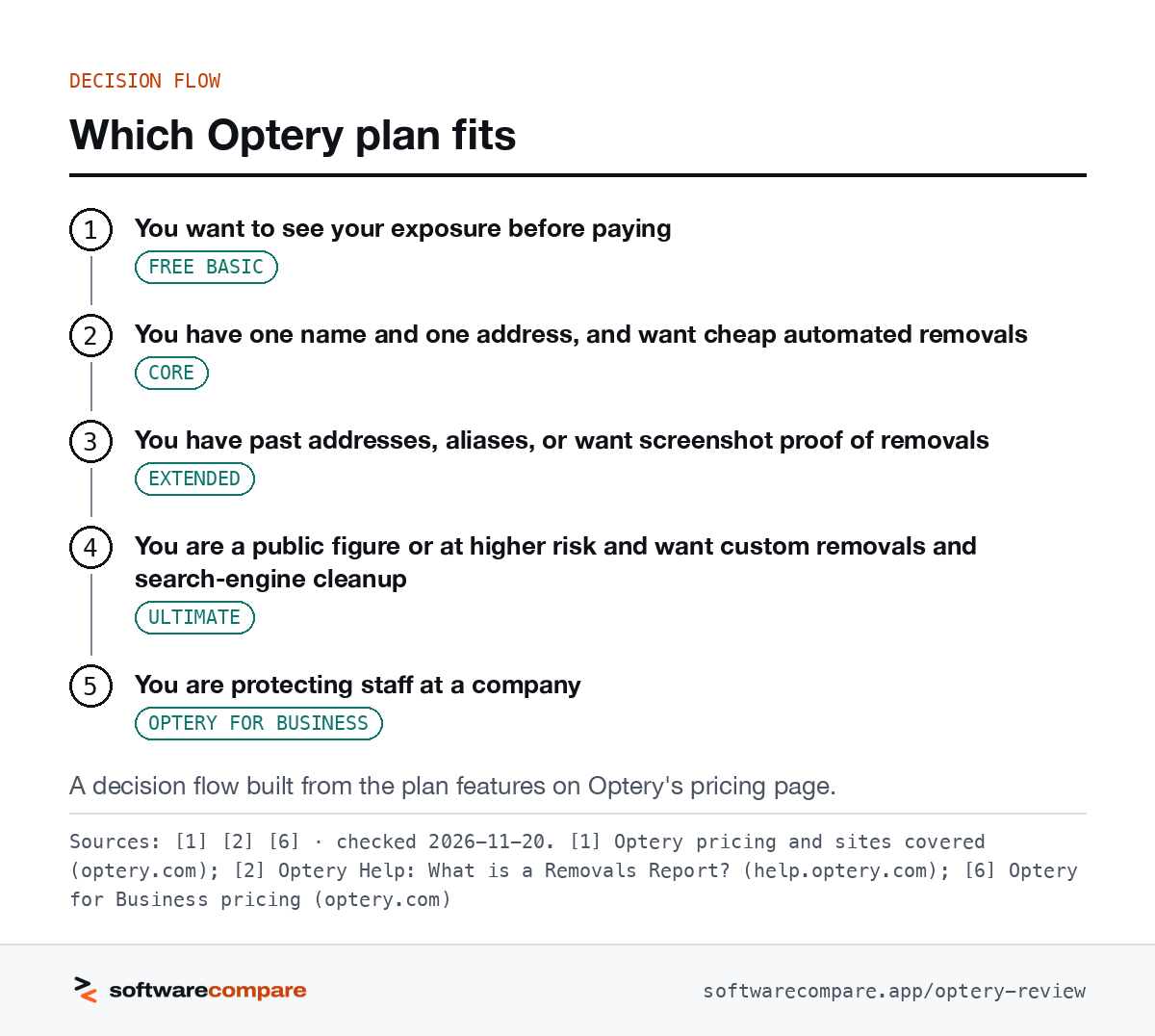
- You want to see your exposure before payingFree Basic
- You have one name and one address, and want cheap automated removalsCore
- You have past addresses, aliases, or want screenshot proof of removalsExtended
- You are a public figure or at higher risk and want custom removals and search-engine cleanupUltimate
- You are protecting staff at a companyOptery for Business
A decision flow built from the plan features on Optery’s pricing page.
Sources: [1] [2] [6] · checked 2026-11-20Download image
Plans
Plans and prices
Optery
Free Basic
Free
checked 2026-11-20
- Exposure Report with screenshots
- Self-service removal tools
- Rescan about every 3 months
Core
$39/yr or $3.99/mo
checked 2026-11-20
- Automated removals from 375+ sites
- One name and city/state for removals
- Fully automated, no Privacy Agent
Extended
$149/yr or $14.99/mo
checked 2026-11-20
- Automated removals from 550+ sites
- Unlimited name variations and past cities
- Removals Reports about every 90 days
Ultimate
$249/yr or $24.99/mo
checked 2026-11-20
- Automated removals from 620+ sites
- Unlimited custom removals (935+ sites total)
- Priority email support
Optery for Business
Quote (prices not shown)
checked 2026-11-20
- Free, Core, Ultimate and Enterprise tiers
- Business privacy dashboard
- SSO/SCIM
Strengths and limits
Strengths and limits

Strengths
- Free Exposure Report with screenshots before you pay
- Before-and-after screenshot Removals Reports on Extended and Ultimate
- Coverage counts published per plan, with a searchable site list
- SOC 2 Type II attestation and a 30-day money-back guarantee
Limits
- Core removes only one name and one city/state per person
- Headline counts include Expanded Reach, which can send your details to brokers that didn't have them
- Removals Reports start only after three months on a paid plan
- Business prices are not published
DeleteMe
Visit DeleteMe (opens in a new tab)
Strengths
- Personal DeleteMe Expert and quarterly privacy reports on every plan
- Custom removal requests included
- In business since 2011
Limits
- No free scanning tier on its pricing page
- Costs more than Optery Core per year
Strengths
- Covers search engines and social media as well as data brokers
- Weekly scans and unlimited custom removals on Advanced
- Team admin, SSO and an API
Limits
- Highest starting price of the three
- Advanced configurations may cost extra
FAQ
Questions people ask
Is Optery legit?
How much does Optery cost?
How many data brokers does Optery cover?
Optery lists automated removals from 375+ sites on Core, 550+ on Extended and 620+ on Ultimate. Without Expanded Reach those figures are 150+, 325+ and 395+. Ultimate also allows custom removal requests for 935+ sites in total1.
What is an Optery Removals Report?
It is a report of before-and-after screenshots showing where your information was listed and that it has been removed. Optery generates one about every three months for Extended and Ultimate customers whose subscription has been active for at least three months2.
How often does Optery remove my data?
Sources
Sources
Small numbers in the text, like 1, point here. Each source shows the date we last checked it.
- 1Optery pricing and sites coveredoptery.com
- 2Optery Help: What is a Removals Report?help.optery.com
- 3Optery Help: How often does Optery run scans and opt outs?help.optery.com
- 4Optery Help: How does Expanded Reach work?help.optery.com
- 5Optery: What is an Exposure Report?optery.com
- 6Optery for Business pricingoptery.com
- 7Optery for Businessoptery.com
- 8About Opteryoptery.com
- 9DeleteMe pricingjoindeleteme.com
- 10Kanary pricingkanary.com
Updated . See something out of date? Tell us and we will check it against the vendor's page.