Remote accessAlternatives
TeamViewer Alternatives for IT Teams: Free, Low-Cost and Self-Hosted Options
Need a TeamViewer alternative? We compare 7 remote access tools on licensing, commercial-use rules, free tiers and self-hosting, using vendor-listed prices.
Disclosure: we may earn a commission if you buy through links on this page. It costs you nothing extra and never decides a verdict or an EDGE mark. How we make money.
Verdict
Verdict
For a paid TeamViewer alternative that bills per technician, Getscreen.me lists $4.17 per technician per month on annual billing plus $0.08 per device, with unlimited concurrent connections on every plan3. If you want to run the servers yourself for free, RustDesk’s open-source self-hosting plan costs $0 and its code is AGPL-3.0911.
At a glance
The alternatives at a glance
| # | Tool | Best for | Starting price | Link |
|---|---|---|---|---|
| 01 | Getscreen.me | Small IT teams and MSPs that want low per-technician pricing with monthly billing available | $4.17/technician/mo billed annually, plus $0.08/device/mochecked 2026-11-20 | Visit (opens in a new tab) |
| 02 | RustDesk | Teams with a Linux admin who want to self-host and pay nothing, or pay little for an admin console | Free (self-hosted OSS); Server Pro from $11.88/mo billed annuallychecked 2026-11-20 | Visit (opens in a new tab) |
| 03 | Zoho Assist | Small businesses that want a free tier the vendor explicitly allows for business use | $10/technician/mo billed annuallychecked 2026-11-20 | Visit (opens in a new tab) |
| 04 | Splashtop | Individuals and small teams who mostly reach their own computers | $6/mo billed annually at $72 (Solo)checked 2026-11-20 | Visit (opens in a new tab) |
| 05 | AnyDesk | Teams that want a direct TeamViewer-style replacement with an on-premises route at the top tier | $28.90/mo billed annually (Solo)checked 2026-11-20 | Visit (opens in a new tab) |
| 06 | ConnectWise ScreenConnect | MSPs that price by concurrent technician and want a self-hosted option | $30/mo billed annually (One)checked 2026-11-20 | Visit (opens in a new tab) |
| 07 | Chrome Remote Desktop | One-off help and reaching your own machines when you already live in Google's ecosystem | No price listed on Google's pageschecked 2026-11-20 | Visit (opens in a new tab) |
Prices are the lowest paid starting price on each vendor's public pricing page on the date shown, in US dollars, before tax. Confirm on the vendor's site before you buy.
If you need a TeamViewer alternative, the deciding questions are rarely about features. They’re about licensing: whether the free version can be used at work, whether you can pay monthly, and whether you can run the server yourself. This page compares seven tools on those terms, using only what each vendor publishes. Our short answer: Getscreen.me is the cheapest per-technician paid option we found3, RustDesk is the free self-hosted route9, and Zoho Assist is the free tier a small business can use without guessing13.
We haven’t run these tools in a lab. Every price and limit below comes from the vendor’s own page, checked on 2026-11-20. See how we compare and our editorial policy.
Why teams look for a TeamViewer alternative
Two things push people off TeamViewer. The first is the free version’s commercial-use detection. TeamViewer defines commercial use as “any use of TeamViewer for purposes that are either directly or indirectly paid for” and says connections to devices flagged as commercial are not possible1. A flagged user can ask for a reset, which TeamViewer says it reviews within 72 hours, and if commercial use is still suspected the ID is not reset1.
The second is the contract. TeamViewer sells annual subscriptions that renew automatically every 12 months unless you cancel at least 28 days before the term ends2. Its pricing page did not display plan prices when we checked, so we can’t quote them here.
The alternatives below split into three groups: cheap hosted tools, self-hosted tools, and free tools with clear business-use rules.
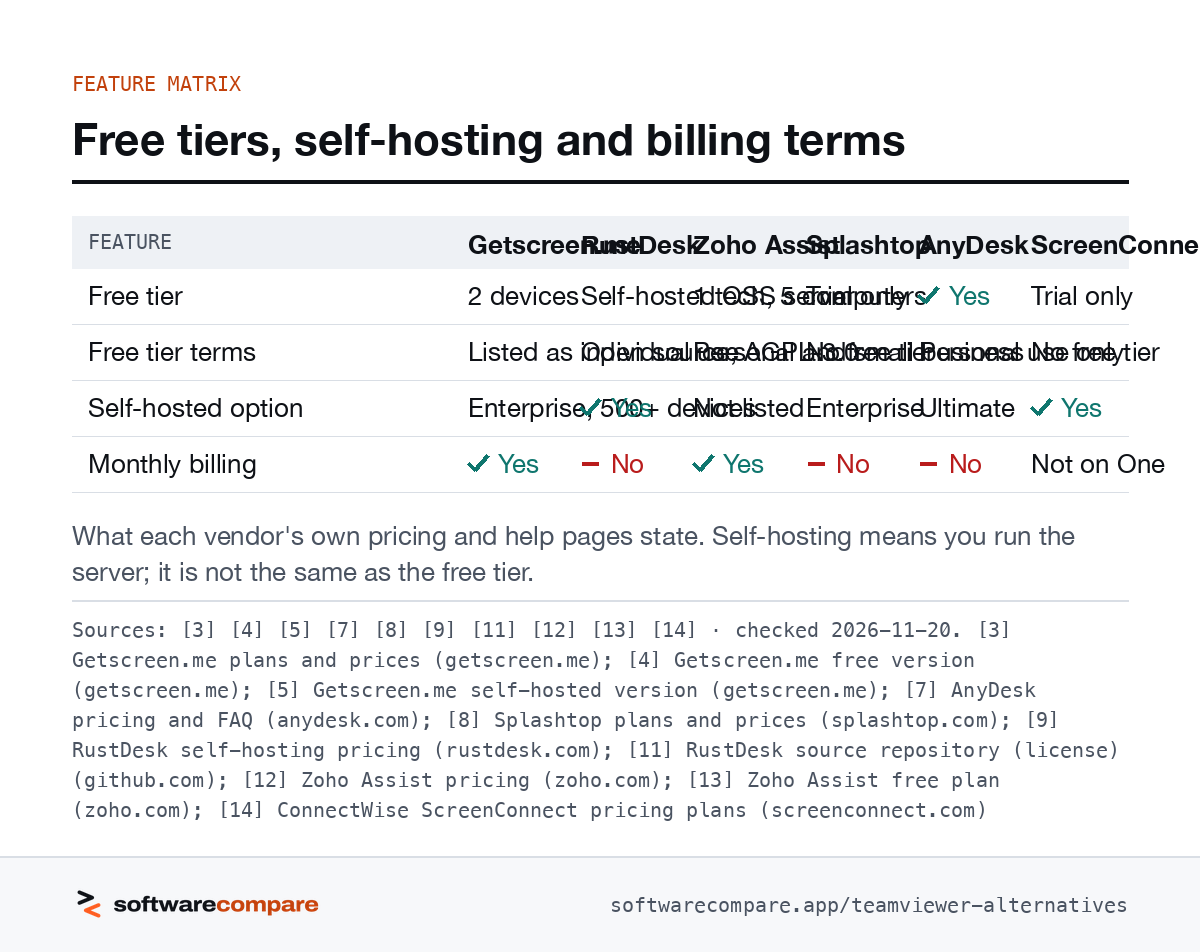
| Feature | Getscreen.me | RustDesk | Zoho Assist | Splashtop | AnyDesk | ScreenConnect |
|---|---|---|---|---|---|---|
| Free tier | 2 devices | Self-hosted OSS server | 1 tech, 5 computers | Trial only | Yes | Trial only |
| Free tier terms | Listed as individual use | Open source, AGPL-3.0 | Personal and small business | No free tier | Personal use only | No free tier |
| Self-hosted option | Enterprise, 500+ devices | Yes | Not listed | Enterprise | Ultimate | Yes |
| Monthly billing | Yes | No | Yes | No | No | Not on One |
What each vendor’s own pricing and help pages state. Self-hosting means you run the server; it is not the same as the free tier.
Sources: [3] [4] [5] [7] [8] [9] [11] [12] [13] [14] · checked 2026-11-20Download image
Getscreen.me
Getscreen.me prices by the piece: you pay for technician seats, devices and a plan tier3. On annual billing, Standard is $4.17 per technician per month, Advanced $6.67 and Enterprise $8.33, plus $0.08, $0.13 or $0.17 per device per month3. Annual payment is 16% cheaper than monthly, so monthly billing exists if you don’t want a 12-month commitment3. Every paid plan lists unlimited concurrent connections, Advanced and Enterprise add unlimited Quick Support invitations for clients, and the maximum file transfer size goes from 4 GB on Standard to unlimited on the higher tiers3.
The free version covers up to 2 devices, 1 technician seat and unlimited session time, and you can connect from a browser4. Getscreen.me files it under individual usage and points teams to the business plans4. There’s also a one-time Personal Lifetime plan with 50 devices, aimed at freelancers and occasional admin work6.
The tiers differ mainly in admin and retention features. Video recording storage is 1 GB per technician on Standard, 2 GB on Advanced and 5 GB on Enterprise, and the HTTP API allows 100 requests per hour per device on Advanced and 1,000 on Enterprise3.
Self-hosting exists but isn’t for small shops. It is Enterprise-only, annual, needs 500+ devices or at least 10 technicians, and needs a Linux admin to run it5. In return you get the top-tier feature set on your own hardware: no cap on concurrent connections, SSO, Active Directory import, audit logging, a Docker-based setup and offline operation on a local network5.
RustDesk
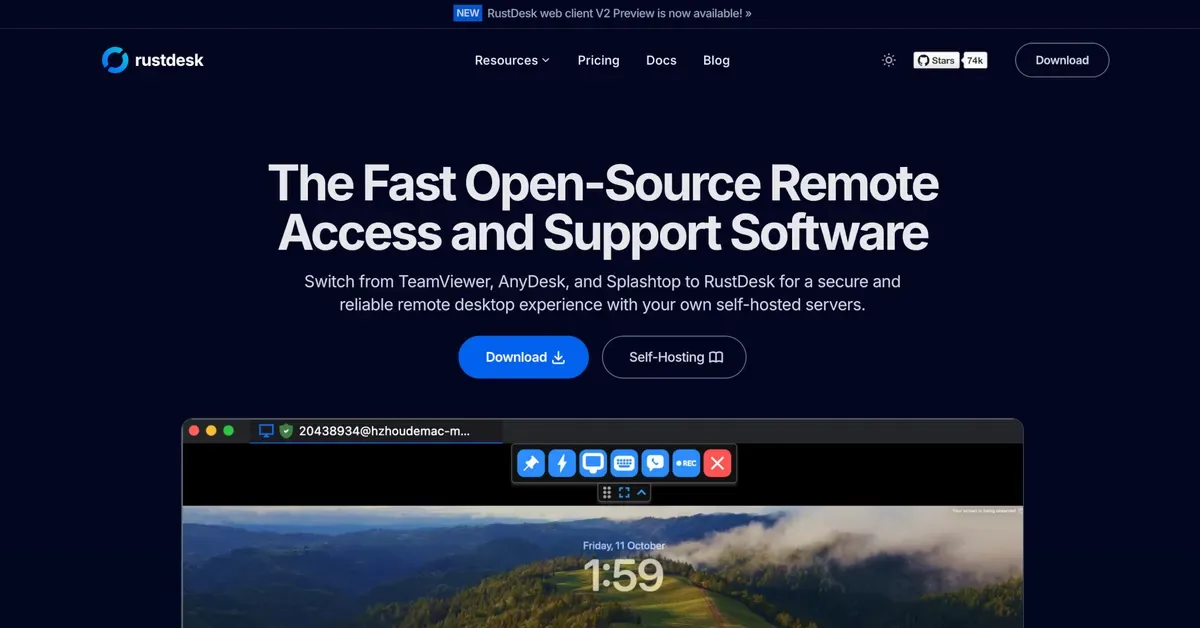
RustDesk is the answer if “free” has to mean free for business and you’re willing to run infrastructure. Its pricing page is explicit that it sells a self-hosting solution, “NOT a SaaS subscription”9. The free plan is open source at $0 with community support9, and the repository is licensed AGPL-3.011.
Self-hosting means two services: an ID server (hbbs) for discovery and a relay server (hbbr) for connections that can’t go direct, and RustDesk lists ports 21115-21117 as the minimum required10. Server Pro adds the admin layer: Individual is $11.88 per month for 1 login user and 20 managed devices, and Basic is $23.88 per month for 10 users and 100 devices, with OIDC, LDAP and a custom client generator9. The Customized plan starts at the Basic price and adds $1.20 per extra user and $0.12 per extra managed device9. Every Pro tier lists unlimited concurrent connections, a web console, 2FA, an address book and an audit log9. Pro is annual payment only, and RustDesk says it doesn’t auto-renew9.
RustDesk’s own site also carries a warning that if a stranger on the phone asks you to install RustDesk, you’re probably being scammed9. That applies to every tool on this list.
Zoho Assist
Zoho Assist is the cleanest pick if you want a free tier and need it to be allowed at work. Zoho says the free edition is “designed for personal and small business use”13. It includes 1 remote support technician, 5 unattended computers, 1 concurrent session and no limit on session duration13.
Paid plans are split by job. Remote Support (ad-hoc sessions) is $10, $15 or $24 per technician per month billed annually, with 2, 4 or 6 concurrent sessions12. Unattended Access is $10 or $15 per month billed annually for 25 unattended computers12. Zoho offers monthly or yearly billing and says you can upgrade, downgrade or cancel at any time12. Session recording and remote script execution sit on the Enterprise Remote Support tier and on Professional Unattended Access12. For bigger teams, a Corporate plan lists 50 licensed technicians, 2 concurrent sessions and 1,000 managed devices, and Zoho quotes concurrent pricing once you pass 10 technicians or 200 devices12.
Splashtop
Splashtop is built around reaching your own computers. Solo is $6 a month, billed annually at $72, for one user and 2 computers; Pro is $99 per user per year with 10 computers per license; Performance is $149 per user per year8. Splashtop says it only offers annual billing8. Enterprise is quote-based and adds SSO, SIEM logging and an on-prem option8. If you support other people’s computers, Splashtop itself points you to its separate Remote Support product8.
AnyDesk
AnyDesk is the closest like-for-like swap, and it has the same personal-use rule. Its pricing FAQ says AnyDesk “is free for personal use” and “professional users need a license”7. Only the person starting a session needs a license; the people you connect to don’t7.
Solo lists at $28.90 per month for 1 user and 100 managed devices, Standard at $49.90 per month with 1 connection and 500 managed devices, and Advanced at $111.90 per month with 2 connections and 1,000 devices7. All plans are billed yearly, and the page showed 20% off one-year terms when we checked7. Extra concurrent connections cost $44.90 each per month7. Ultimate is quote-based and can run in the cloud or on-premises7.
The team limits matter if you’re replacing a TeamViewer business licence. Standard allows a team of up to 20 users and scales to 20 connections; Advanced allows up to 100 users, scales to 50 connections and adds a command-line interface, MSI mass deployment and Windows Group Policy support7. Ultimate starts with 5 licensed users and 2,000 managed devices and adds SSO7.
ConnectWise ScreenConnect
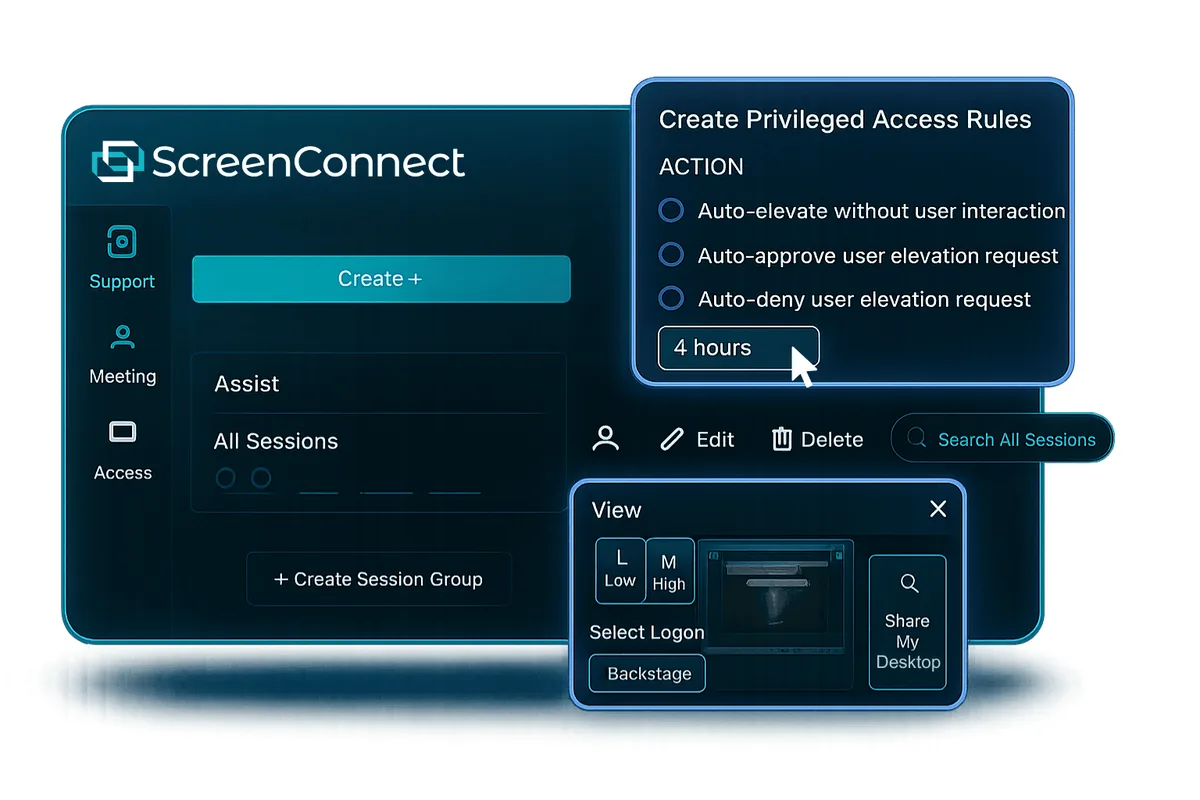
ScreenConnect is aimed at support desks and MSPs. One is $30 per month billed annually, restricted to a single license with 1 session and 10 unattended agents, and is offered annually only14. Standard is $47 and Premium $57 per month billed annually per concurrent technician, with up to 3 and 10 sessions per tech and unlimited unattended agents14. The FAQ confirms a self-hosted (on-premise) option14. ScreenConnect sells both concurrent licences, where several technicians share sessions at the same time, and agent-based licences that cap how many access agents you can install14. It also separates Remote Support licences, which include remote access and meetings, from Remote Access-only licences14. Integrations include ConnectWise PSA, Automate, Zendesk and Freshdesk14.
Chrome Remote Desktop
Chrome Remote Desktop covers two jobs: reaching your own Mac, Windows or Linux computer with a PIN, and helping someone through a one-time access code15. When you share your computer, it asks you to confirm every 30 minutes15. Google’s pages don’t list a price or a paid tier. Workspace admins can turn it on or off per user and block connections from outside the local network or VPN16. Google’s pages don’t describe technician seats, branding or ticketing tools, so it isn’t a replacement for a support team’s TeamViewer licence.
Before you cancel TeamViewer
A few contract details decide when you can actually switch:
- Notice period. TeamViewer renews every 12 months unless you cancel at least 28 days before the term ends2. Put that date in a calendar before you start a trial elsewhere.
- Who needs a licence. On TeamViewer and AnyDesk, only the technician starting the session needs one27. Count technicians, not the people you support.
- Concurrency. Check how many sessions you run at the same moment. AnyDesk Standard starts with 1 connection7, Zoho Assist Standard allows 212, ScreenConnect Standard allows up to 3 per tech14, and Getscreen.me and RustDesk Pro list unlimited concurrent connections39.
- Unattended devices. Servers and kiosks you reach without a person present count against device limits: 100 on AnyDesk Solo7 and 10 on ScreenConnect One14. Zoho Assist prices Unattended Access per 25 computers12.
How to choose
Start with how you’ll use it, then check the licence terms.
- You support customers and want low cost per seat: Getscreen.me, with monthly billing available3. ScreenConnect if you price by concurrent tech and want PSA integration14.
- You must self-host, or “free” has to cover business use: RustDesk’s open-source server9. Budget for a Linux admin and open ports10.
- You’re a small business that wants a free tier you’re allowed to use: Zoho Assist Free13.
- You mostly reach your own machines: Splashtop Solo or Pro8.
- You want the closest swap and can commit to a year: AnyDesk7.
Before you sign anything, read the renewal terms. TeamViewer, AnyDesk, Splashtop and RustDesk Pro all bill yearly2789.
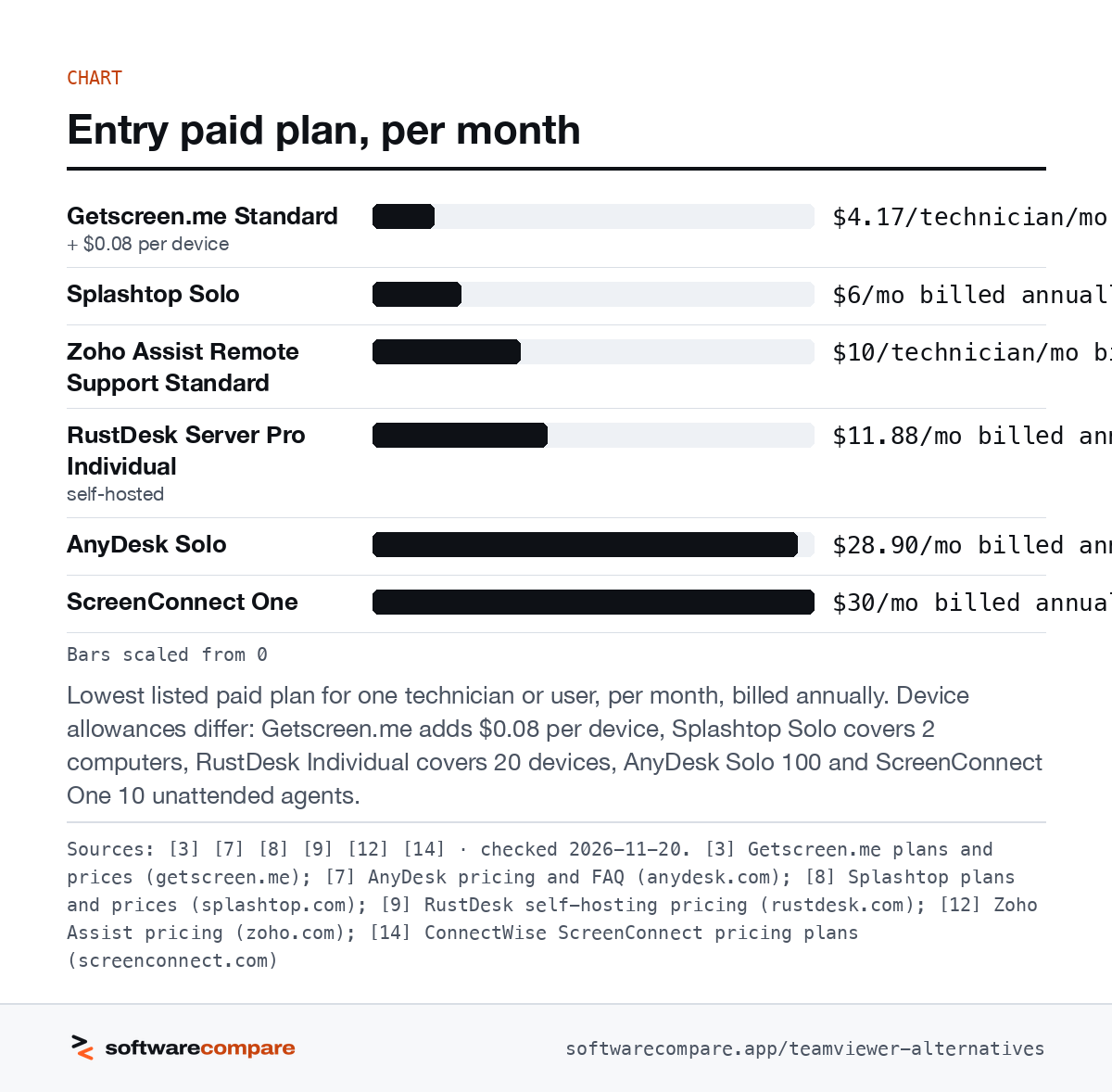
Bars scaled from 0
Lowest listed paid plan for one technician or user, per month, billed annually. Device allowances differ: Getscreen.me adds $0.08 per device, Splashtop Solo covers 2 computers, RustDesk Individual covers 20 devices, AnyDesk Solo 100 and ScreenConnect One 10 unattended agents.
Sources: [3] [7] [8] [9] [12] [14] · checked 2026-11-20Download image
Strengths and limits
Strengths and limits
Getscreen.me
Visit Getscreen.me (opens in a new tab)Strengths
- Unlimited concurrent connections on all three paid plans
- Pay per technician seat and per device, so small fleets stay cheap
- Free plan covers 2 devices with unlimited session time
- Connect from a browser on the free plan
Limits
- Self-hosted version is Enterprise-only, annual, and starts at 500+ devices or 10+ technicians
- Free plan has 1 technician seat and no Quick Support
RustDesk
Visit RustDesk (opens in a new tab)Strengths
- Open-source server you host yourself at no license cost
- Client and server code published under AGPL-3.0
- Server Pro adds a web console, 2FA, audit log and access control
- Pro plans don't auto-renew
Limits
- You run, patch and expose the servers yourself
- Free self-hosting plan comes with community support only
- Pro is annual payment only
Zoho Assist
Visit Zoho Assist (opens in a new tab)Strengths
- Free plan described as designed for personal and small business use
- Free plan has no session time limit and 5 unattended computers
- Monthly or yearly billing, and the vendor says you can cancel at any time
- Separate plans for ad-hoc support and unattended access
Limits
- Free plan allows 1 technician and 1 concurrent session
- Unattended Access is priced per 25 unattended computers
Splashtop
Visit Splashtop (opens in a new tab)Strengths
- Low entry price for one user and up to 2 computers
- Pro and Performance cover 10 computers per user license
- On-premises option on Enterprise
Limits
- Annual billing only; no monthly plans
- No free plan on the pricing page, only a free trial
Strengths
- Only the session initiator needs a license
- Standard includes 500 managed devices and custom-branded clients
- Ultimate can run in the cloud or on-premises
Limits
- Free version is for personal use only
- All plans are billed yearly
- Each extra concurrent connection is an add-on
ConnectWise ScreenConnect
Visit ConnectWise ScreenConnect (opens in a new tab)Strengths
- Unlimited unattended access agents on Standard and Premium
- Self-hosted (on-premise) option offered
- PSA, Automate, Zendesk and Freshdesk integrations listed
Limits
- One plan is limited to 1 session and 10 unattended agents, and is annual only
- Per-tech pricing is higher than the cheaper tools here
Chrome Remote Desktop
Visit Chrome Remote Desktop (opens in a new tab)Strengths
- Works with Mac, Windows and Linux computers
- One-time access codes for remote support
- Google Workspace admins can turn it on or off per user and restrict it to the local network
Limits
- Shared sessions ask the host to reconfirm every 30 minutes
- Google's pages list no technician seats, branding or ticketing integrations
FAQ
Questions people ask
Is there a free TeamViewer alternative for business use?
What does TeamViewer count as commercial use?
TeamViewer defines it as any use that is directly or indirectly paid for, and says connections to devices flagged as commercial are not possible. It reviews reset requests within 72 hours1.
Which TeamViewer alternatives can be self-hosted?
Which alternatives offer monthly billing?
Sources
Sources
Small numbers in the text, like 1, point here. Each source shows the date we last checked it.
- 1TeamViewer Knowledge Base: commercial use suspectedteamviewer.com
- 2TeamViewer prices and license overview (pricing FAQ)teamviewer.com
- 3Getscreen.me plans and pricesgetscreen.me
- 4Getscreen.me free versiongetscreen.me
- 5Getscreen.me self-hosted versiongetscreen.me
- 6Getscreen.me Personal Lifetime plangetscreen.me
- 7AnyDesk pricing and FAQanydesk.com
- 8Splashtop plans and pricessplashtop.com
- 9RustDesk self-hosting pricingrustdesk.com
- 10RustDesk self-host documentationrustdesk.com
- 11RustDesk source repository (license)github.com
- 12Zoho Assist pricingzoho.com
- 13Zoho Assist free planzoho.com
- 14ConnectWise ScreenConnect pricing plansscreenconnect.com
- 15Google Chrome Help: access another computer with Chrome Remote Desktopsupport.google.com
- 16Chrome Enterprise Help: Chrome Remote Desktop admin controlssupport.google.com
Updated . See something out of date? Tell us and we will check it against the vendor's page.