Password managersAlternatives
LastPass Alternatives: Where to Move Your Vault and How to Export It
LastPass alternatives ranked by how cleanly they import a LastPass vault: 1Password, Bitwarden, Proton Pass, Keeper, Passpack and NordPass, with prices checked.
Disclosure: we may earn a commission if you buy through links on this page. It costs you nothing extra and never decides a verdict or an EDGE mark. How we make money.

Verdict
Verdict
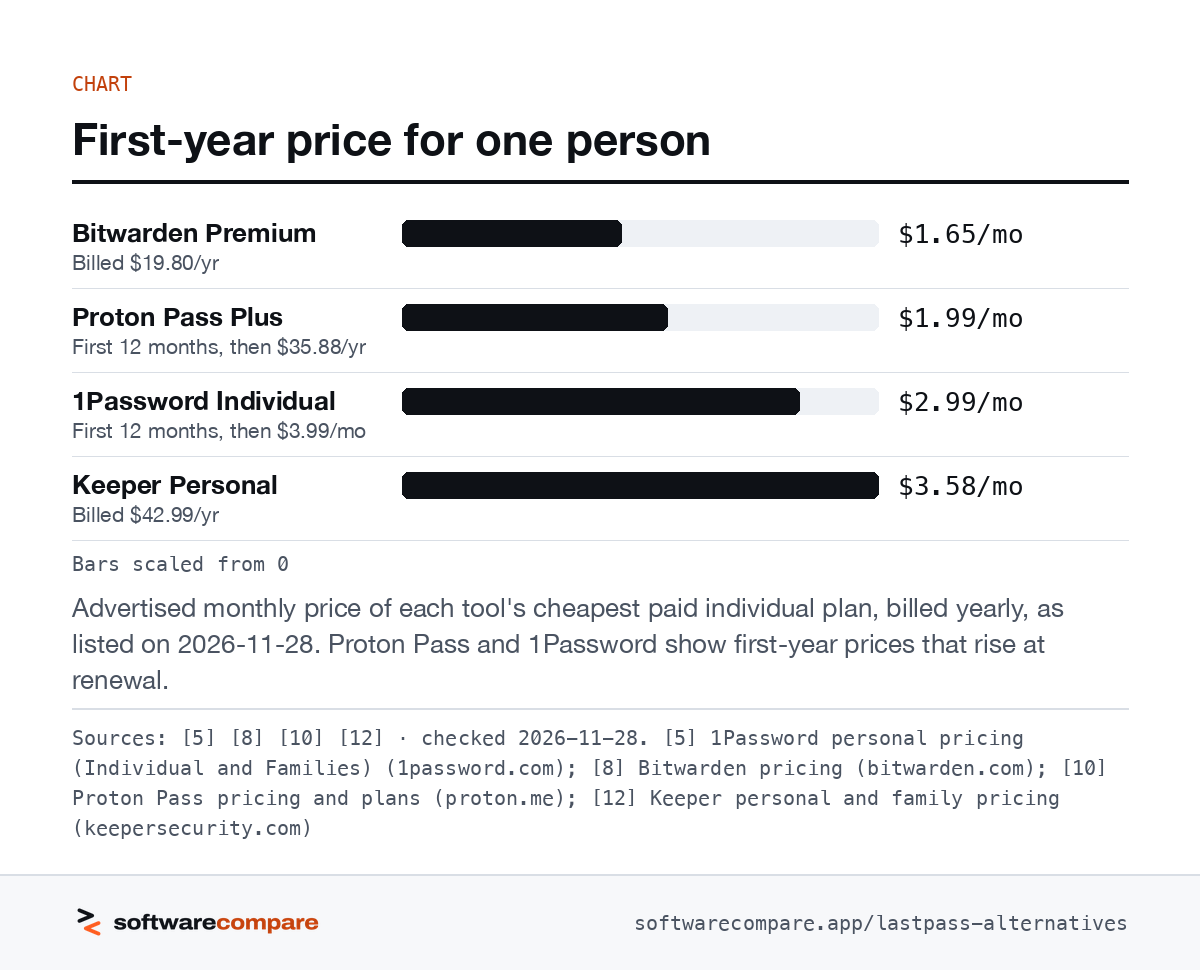
1Password is the best LastPass alternative for most households and teams, because its desktop app signs in to LastPass and brings over attachments and shared folders7. If cost matters most, Bitwarden Premium is $19.80 a year and its free plan works on unlimited devices8.
Bars scaled from 0
Advertised monthly price of each tool’s cheapest paid individual plan, billed yearly, as listed on 2026-11-28. Proton Pass and 1Password show first-year prices that rise at renewal.
Sources: [5] [8] [10] [12] · checked 2026-11-28Download image
At a glance
The alternatives at a glance
| # | Tool | Best for | Starting price | Link |
|---|---|---|---|---|
| 01 | 1Password | Families and teams who share folders in LastPass and want the most complete import | $2.99/mo billed yearly for the first 12 months (then $3.99/mo)checked 2026-11-28 | Visit (opens in a new tab) |
| 02 | Bitwarden | LastPass Free users who need a free plan that works on phone and computer | $1.65/mo, billed annually at $19.80checked 2026-11-28 | Visit (opens in a new tab) |
| 03 | Proton Pass | Privacy-minded switchers who want email aliases and a free plan on every device | $1.99/mo, billed $23.88 for the first 12 months (renews at $35.88/yr)checked 2026-11-28 | Visit (opens in a new tab) |
| 04 | Keeper | Households that keep files and two-factor codes in LastPass | $3.58/mo, $42.99 billed annuallychecked 2026-11-28 | Visit (opens in a new tab) |
| 05 | Passpack | Small LastPass Teams accounts of up to 20 people | $1.66/user/mo, paid annually (Teams, up to 20 people)checked 2026-11-28 | Visit (opens in a new tab) |
| 06 | NordPass | Switchers who want an automatic import and a 6-person family plan on a 2-year term | $1.39/mo on the 2-year plan, $37.53 for the first 27 monthschecked 2026-11-28 | Visit (opens in a new tab) |
Prices are the lowest paid starting price on each vendor's public pricing page on the date shown, in US dollars, before tax. Confirm on the vendor's site before you buy.
Most people looking for a LastPass alternative already know they want to leave. The harder question is which manager takes your vault with the least loss. Our pick for most households and teams is 1Password: its desktop app signs in to LastPass and brings over shared folders, attachments and one-time password codes stored on items7. If you’re on LastPass Free and want to stay free, Bitwarden works on unlimited devices at no cost and imports directly from LastPass89.
We ranked six tools by how well each fits someone leaving LastPass, using each vendor’s pricing pages and import guides as they read on 2026-11-28. We didn’t install these apps for this article, so there are no scores, and the order isn’t set by commission. Our comparison method and editorial policy cover how that works.
Why people leave LastPass
Three reasons come up, and LastPass’s own pages document each of them.
The free plan covers one device type. LastPass Free is “Limited to 1 device type”1. LastPass counts two types: computers (all desktop and laptop browsers) and mobile (phones, tablets and watches)1. If you use a password manager on both a laptop and a phone, Free no longer fits.
The 2022 incident. In its December 22, 2022 notice, LastPass said an attacker copied a backup of customer vault data. Website URLs in that backup were unencrypted, while usernames, passwords, secure notes and form-fill data were encrypted with 256-bit AES and need a key derived from each user’s master password2. LastPass told customers with default master password settings that no action was needed, and told those with weaker master passwords to consider changing the passwords stored in their vaults2. Our LastPass vs 1Password comparison goes through the incident in more detail.
Plan limits for teams. LastPass Teams caps out at 50 users, and the Business plan includes single sign-on for three apps; unlimited SSO apps are on Business Max1.
On price, we can’t give you LastPass’s numbers. The dollar amounts on its pricing page didn’t load when we read it, so we don’t quote them. The page does say new users get 50% off the first year of Premium, Families or Plus until November 30, 2026, and that the price doesn’t apply to renewals1.
Export your LastPass vault first
Whichever manager you pick, plan the export before you cancel anything. LastPass’s generic CSV export runs only from the browser extension: open the extension, go to the Account tab, then Fix a problem yourself, Export vault items, and Export data for use anywhere3. A CSV file downloads.
Know what the file leaves behind. LastPass says the CSV export doesn’t include attachments or the TOTP codes generated inside your vault, and that custom item types and custom fields aren’t supported3. On a Teams or Business account, an admin can turn on the “Prohibit export” policy, so ask your admin first if the option is missing3.
If you’re on Free and set Mobile as your active device type, you can still log in on a computer and export4.
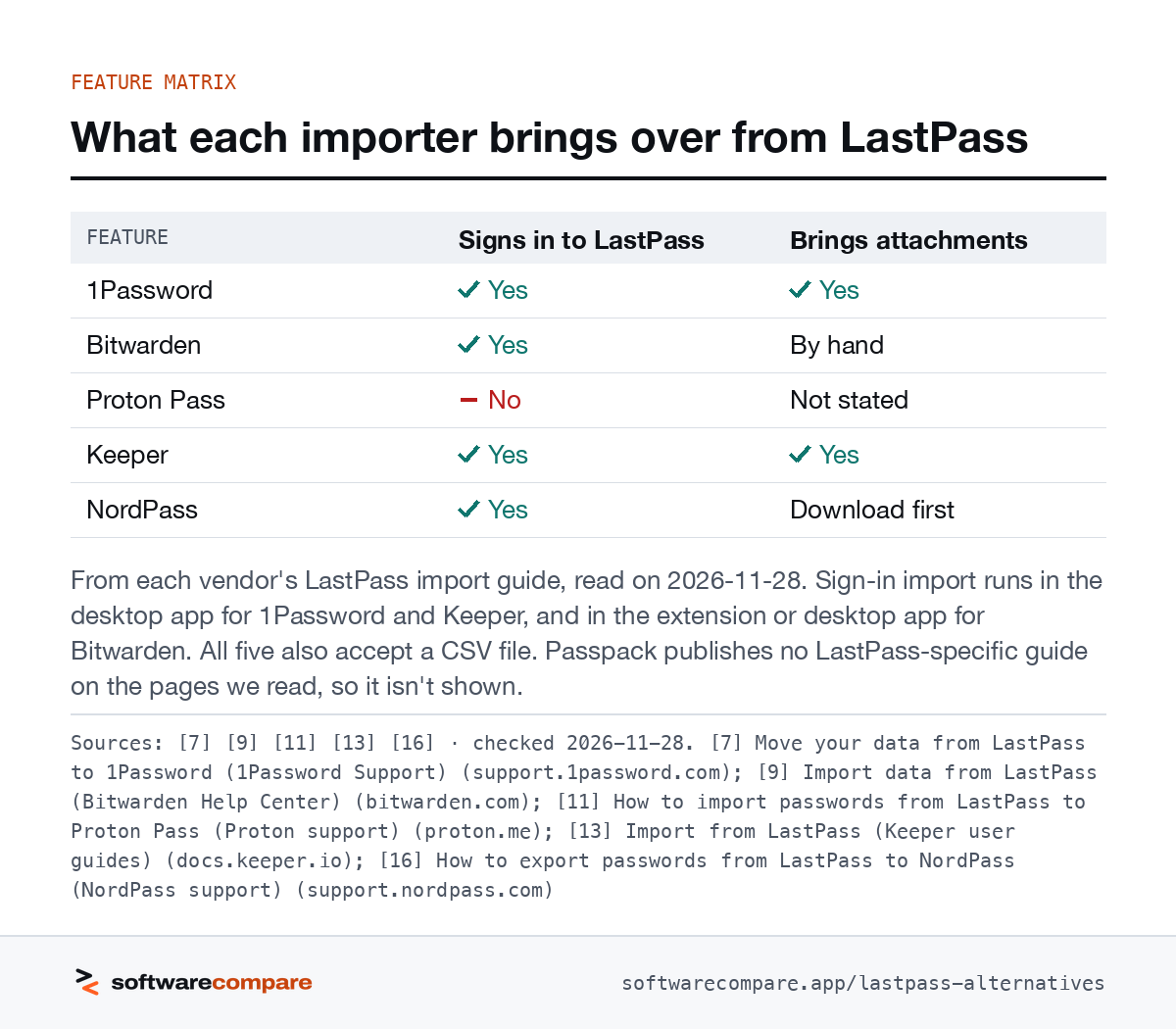
Several of the managers below can skip the CSV by signing in to LastPass for you. That route usually brings more across, as the table shows.
| Feature | Signs in to LastPass | Brings attachments |
|---|---|---|
| 1Password | Yes | Yes |
| Bitwarden | Yes | By hand |
| Proton Pass | No | Not stated |
| Keeper | Yes | Yes |
| NordPass | Yes | Download first |
From each vendor’s LastPass import guide, read on 2026-11-28. Sign-in import runs in the desktop app for 1Password and Keeper, and in the extension or desktop app for Bitwarden. All five also accept a CSV file. Passpack publishes no LastPass-specific guide on the pages we read, so it isn’t shown.
Sources: [7] [9] [11] [13] [16] · checked 2026-11-28Download image
1Password
1Password is our top pick if your LastPass account holds shared folders, attachments or a family’s worth of logins. The import runs in the 1Password desktop app on Mac, Windows or Linux: you choose Import, pick LastPass, and enter your LastPass details7. It brings over passwords and secure notes, items shared with you, and files and one-time passwords attached to items. Each LastPass shared folder becomes a 1Password vault, which only an admin of that shared folder can import7.
A few things stay behind. 1Password says passkeys won’t be imported, and neither will codes saved in the separate LastPass Authenticator app7. If you sign in to LastPass with SSO, you’ll need to add a redirect URI at your identity provider first, and SMS two-factor has to be switched to another method before the import7.
Prices: Individual is $3.99/mo billed yearly, cut to $2.99/mo for the first 12 months for new customers who buy on 1Password.com. Families is $5.99/mo ($4.49/mo in the first year) for 5 users. Both start with a 14-day trial that doesn’t ask for a credit card5. For work accounts, Business is $8.99 per user per month billed yearly, and the Teams Starter Pack is $24.95 a month for 10 members, with room for up to 206.
There’s no free plan on 1Password’s pricing page5, and Families covers 5 people where LastPass Families covers 615. If you’re deciding between the two finalists, our Proton Pass vs 1Password page compares them directly.
Bitwarden
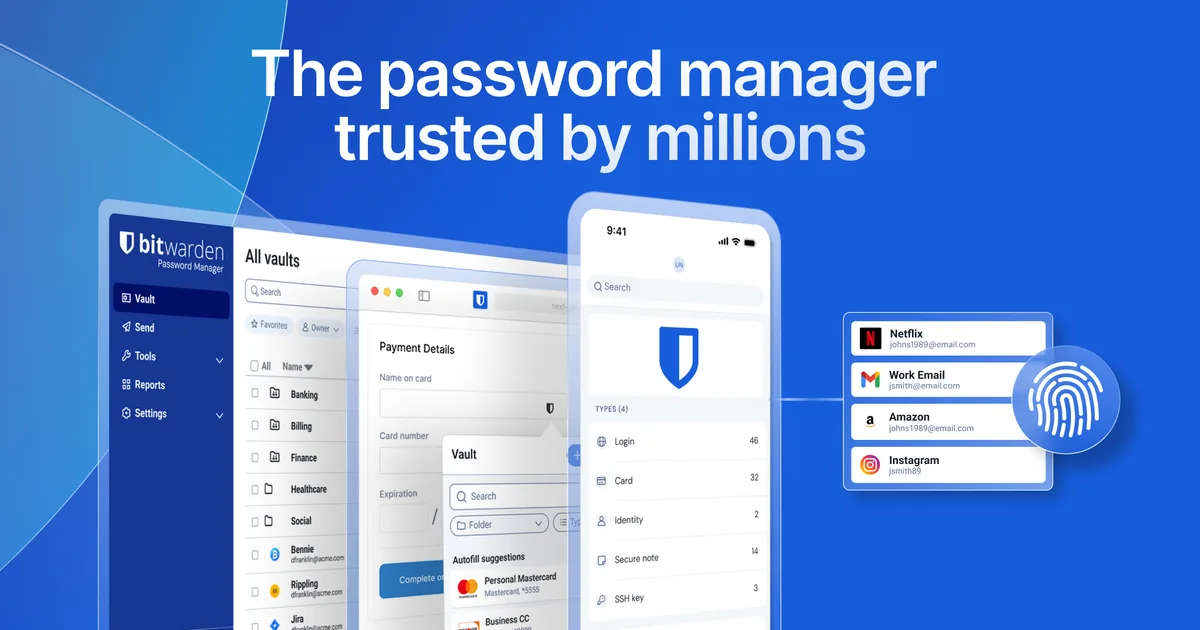
Bitwarden is the answer for LastPass Free users who don’t want to pay. Its free plan lists unlimited devices, unlimited passwords and sharing with one other user8. That removes the one-device-type rule that pushes most people off LastPass Free1.
The import is direct too. Bitwarden’s browser extensions and desktop apps can pull your vault from LastPass “without requiring you to upload a file”, and the web app accepts a LastPass CSV under Tools, Import9. Its help page lists the rough edges plainly:
- File attachments and trash have to be uploaded to the new vault by hand9.
- Importing doesn’t check for duplicates, so a second run doubles your items9.
- A free organization holds two collections, so a LastPass file with three or more groupings fails until you remove that column9.
- Teams that sign in to LastPass with SSO need a LastPass admin to run a setup step first, and Google Workspace and ADFS aren’t supported for direct import9.
Premium is $1.65/mo, billed at $19.80 a year, and Families covers up to 6 users for $47.88 a year8. Teams is $4 per user per month and Enterprise $6, both billed annually8. Bitwarden lists open-source security as a core feature and offers self-hosting, which runs the Bitwarden server on your own network8.
We have no affiliate relationship with Bitwarden. It’s ranked second because it fits.
Proton Pass
Proton Pass suits people who left LastPass partly over privacy and want more from a free plan. Proton Free includes unlimited devices, unlimited logins, passkeys on all devices, 10 hide-my-email aliases and vault sharing with 2 other people10. Item-level sharing needs a paid plan10.
The move runs through a file. You export a CSV from the LastPass extension, then in the Proton Pass extension open Settings, Import, choose LastPass as the provider and drop in the file11. Proton’s guide doesn’t say which item types come across, so check your attachments by hand afterwards.
Pass Plus is $1.99/mo, billed $23.88 for the first 12 months and $35.88 a year after that. Pass Family covers 6 accounts at $33.48 for the first year, then $59.88 a year. Proton Unlimited, which bundles Pass with Proton’s other apps, is $77.88 for the first year and $119.88 after10. Pass Plus and Proton Unlimited carry a 30-day money-back guarantee10.
Keeper

Keeper is worth a look if your LastPass vault holds files and two-factor codes that you don’t want to rebuild. Its desktop app imports from LastPass after you enter your LastPass credentials, and Keeper’s guide says that route carries passwords, folders, shared folders, TOTP codes and file attachments, with LastPass templates and custom fields mapped to Keeper record types13. If you protect LastPass with a security key, Keeper asks you to switch to TOTP or another method first13. A CSV import through the web vault is the fallback13.
Personal is $3.58/mo, or $42.99 billed annually, with unlimited devices and unlimited password sharing12. Family is $7.67/mo, or $91.99 a year, for 5 users and includes 10 GB of secure file storage and emergency access12. BreachWatch, Keeper’s dark-web alert service, is a paid add-on12, while LastPass lists dark web monitoring in every plan, including Free1. Budget for that if you rely on the alerts.
Passpack
Passpack is for small business accounts. Its plans page lists Teams, Business and Enterprise and no personal plan14, so it’s a fit for a LastPass Teams admin with a small staff rather than for a household.
Teams is $1.66 per user per month, paid annually, for up to 20 people. Business is $4.50 per user per month paid annually, with a monthly plan available. Enterprise is quoted on request, and both paid tiers come with a 28-day free trial14. The feature list includes import and export of passwords, TOTP, emergency access codes, YubiKey support and encrypted sharing, with single sign-on among the premium features14.
We didn’t find a LastPass-specific import guide on the Passpack pages we read, so plan on the CSV route from the LastPass extension3. If your team is close to LastPass’s 50-user Teams ceiling1, Passpack’s 20-person Teams cap is too small and you’d be on Business.
NordPass
NordPass is last here because its free plan has a limit close to the one many people are leaving. Its comparison table marks “Access on multiple devices” as not included on Free15.
Paid plans fix that. Premium is $1.39/mo on the 2-year plan, $37.53 for the first 27 months, and Family is $2.49/mo, $67.23 for the first 27 months, for 6 user accounts15. Both carry a 30-day money-back guarantee15. For business, Teams is sold as a 10-user pack only at $1.79 per user per month, and Business starts at 5 users for $3.59 per user per month15.
The import is easy. In NordPass settings you choose Import items, pick LastPass and enter your LastPass login, then select the passwords to transfer16. NordPass notes that LastPass exports don’t include file attachments and suggests downloading them first. LastPass item categories such as SSH keys, custom items and bank accounts arrive as secure notes16. For more on how NordPass compares, see our NordPass alternatives list.
How to choose a LastPass alternative
Match the pick to what you’d lose in the move:
- Shared folders and attachments for a family or team: 1Password. Its direct import turns shared folders into vaults and keeps attachments with their items7.
- You’re on Free and use a phone and a computer: Bitwarden. Free works on unlimited devices8.
- Email aliases and a shareable free vault: Proton Pass, with 10 free aliases and vault sharing with 2 others10.
- TOTP codes and files stored in LastPass: Keeper’s desktop import carries both13.
- A LastPass Teams account of 20 or fewer: Passpack Teams at $1.66 per user per month14.
- A 6-person family plan on a two-year prepay: NordPass Family15.
Compare renewal prices before you buy. 1Password and Proton Pass both show first-year prices that go up after 12 months510, while Bitwarden’s $19.80 a year has no intro step8.
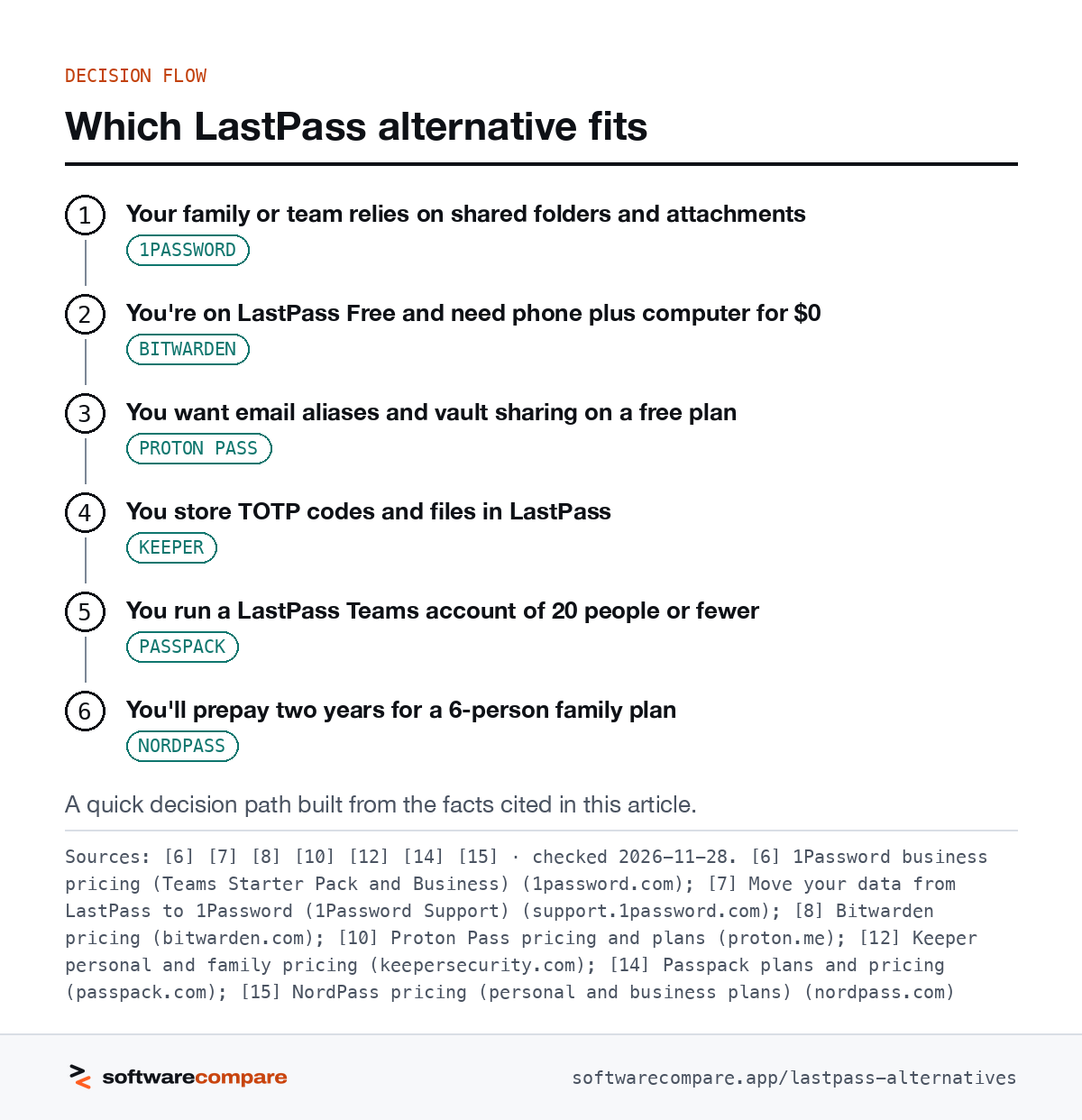
- Your family or team relies on shared folders and attachments1Password
- You're on LastPass Free and need phone plus computer for $0Bitwarden
- You want email aliases and vault sharing on a free planProton Pass
- You store TOTP codes and files in LastPassKeeper
- You run a LastPass Teams account of 20 people or fewerPasspack
- You'll prepay two years for a 6-person family planNordPass
A quick decision path built from the facts cited in this article.
Sources: [6] [7] [8] [10] [12] [14] [15] · checked 2026-11-28Download image
After the import: a short cleanup list
- Open the new vault and spot-check a few logins, secure notes and anything that had an attachment in LastPass.
- Re-add passkeys and LastPass Authenticator codes by hand where the importer skipped them7.
- Delete the CSV file. It holds every password in plain text, and NordPass’s guide warns against sending it over email or untrusted channels16.
- Turn on two-factor sign-in for the new manager before you cancel LastPass.
- Cancel LastPass once you’ve used the new vault for a week or so without going back.
Strengths and limits
Strengths and limits
1Password
Visit 1Password (opens in a new tab)Strengths
- Desktop app imports straight from your LastPass account, no CSV needed
- Attachments and item one-time passwords come across with their items
- LastPass shared folders become 1Password vaults
- 14-day trial with no credit card
Limits
- No free plan on the pricing page
- Passkeys and LastPass Authenticator codes don't import
- Families covers 5 people; LastPass Families covers 6
Bitwarden
Visit Bitwarden (opens in a new tab)Strengths
- Free plan covers unlimited devices and unlimited passwords
- Extensions and desktop apps import directly from LastPass
- Families plan covers 6 users for $47.88 a year
- Open-source code and a self-hosting option
Limits
- Attachments have to be uploaded by hand after the import
- Importing twice creates duplicates
- No affiliate relationship with us, so no tracked link
Proton Pass
Visit Proton Pass (opens in a new tab)Strengths
- Free plan includes unlimited devices, passkeys and 10 hide-my-email aliases
- Free plan can share a vault with 2 other people
- LastPass is a built-in import source
- 30-day money-back guarantee on Pass Plus
Limits
- Import works from a CSV file, not a direct sign-in
- First-year price rises at renewal
Strengths
- Desktop app imports passwords, shared folders, TOTP codes and attachments
- Family plan includes 10 GB of secure file storage
- Unlimited devices and sharing on Personal
Limits
- Dark-web alerts (BreachWatch) are a paid add-on
- Family plan covers 5 users
- Security-key users must switch LastPass to another MFA method before importing
Passpack
Visit Passpack (opens in a new tab)Strengths
- Teams plan priced per user for up to 20 people
- 28-day free trial
- Business plan offers a monthly option
Limits
- No personal or family plan on the plans page
- No LastPass-specific import guide on the pages we read
NordPass
Visit NordPass (opens in a new tab)Strengths
- Imports from LastPass after you enter your LastPass login
- Family plan covers 6 user accounts
- 30-day money-back guarantee on personal plans
Limits
- Free plan doesn't include access on multiple devices
- LastPass attachments must be downloaded separately
- Teams is sold only as a 10-user pack
FAQ
Questions people ask
What is the best free LastPass alternative?
Can I still export my vault if I'm on LastPass Free with Mobile as my device type?
Yes. LastPass says Free users can still log in on a computer and export their vault data, even after the final device type switch4.
Do my LastPass attachments move to the new password manager?
Which LastPass alternative works for a business team?
Sources
Sources
Small numbers in the text, like 1, point here. Each source shows the date we last checked it.
- 1LastPass plans and pricinglastpass.com
- 2LastPass: Notice of Security Incident (updated 2022-12-22)blog.lastpass.com
- 3Export vault data from LastPass as a generic CSV file (LastPass Support)support.lastpass.com
- 4Exporting as a LastPass Free user with Mobile as the active device type (LastPass Support)support.lastpass.com
- 51Password personal pricing (Individual and Families)1password.com
- 61Password business pricing (Teams Starter Pack and Business)1password.com
- 7Move your data from LastPass to 1Password (1Password Support)support.1password.com
- 8Bitwarden pricingbitwarden.com
- 9Import data from LastPass (Bitwarden Help Center)bitwarden.com
- 10Proton Pass pricing and plansproton.me
- 11How to import passwords from LastPass to Proton Pass (Proton support)proton.me
- 12Keeper personal and family pricingkeepersecurity.com
- 13Import from LastPass (Keeper user guides)docs.keeper.io
- 14Passpack plans and pricingpasspack.com
- 15NordPass pricing (personal and business plans)nordpass.com
- 16How to export passwords from LastPass to NordPass (NordPass support)support.nordpass.com
Updated . See something out of date? Tell us and we will check it against the vendor's page.